
Workspaces Documentation
Workspaces are a modern way to manage cloud resources between one or more users within an organization of any size. This page explains the core concepts of Users, Workspaces, and Organizations as implemented at UpCloud.

User
User is set a personal account details and credentials used for authentication. One user can belong to any number of organizations and workspaces. Users can join organizations and workspaces through invitations. A user who joins an organization is assigned an organization role within that organization. A user who joins a workspace receives a workspace access level based on their granted access level.
Workspace
Workspacea are entities holding resources, credits, and billing information. In other words, a Workspace operates similar to any main account, but with a built-in member management.
A Workspace always belongs to a one single organization.
Once created, workspaces have one or more members. Each Workspace member has a Workspace access level, which determines which actions the member can perform in the workspace. Workspace members can be invited and removed by members with sufficient access level. The access level of existing members can also be modified.
Organization
An Organization is an entity holding zero or more workspaces. An organization can be set up to use OpenID Connect (OIDC), which permits organization members to access the organization and its workspaces using the custom SSO solution.
The organization has members. Each organization member has an organizational role that determines which actions the member can perform within the organization. Organization members can be invited and removed by members with sufficient access level. The access level of existing members can also be modified. Organization members with the owner or admin role also inherit access to each workspace in the organization.
Billing
Each workspace requires its own payment information to be set up. An exception is invoicing customers, for whom additional workspaces will be added to their existing invoice.
Each workspace has its own credits, meaning credits topped up to one workspace cannot be used in another.
The dashboard) displays credit usage for your current workspace:

Similarly, the billing page) displays credit usage for your current workspace:
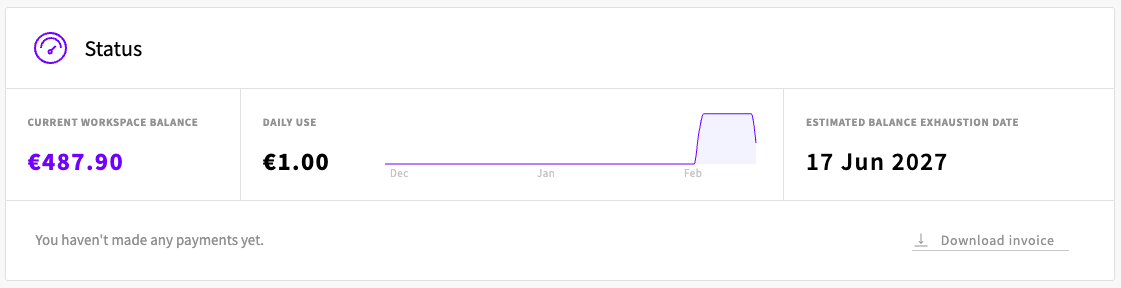
Additionally, all billing log) are for your current workspace.