How to get started using the UpCloud API with HTTP Basic authentication
This guide covers how to authenticate with the UpCloud API using a subaccount's username and password over HTTP Basic authentication. For new integrations we recommend using API tokens instead, as they have configurable expiration dates, can be restricted to specific IP addresses, and can be revoked individually if compromised. Username and password authentication remains fully supported and is documented here for tools and workflows that still rely on it.
The programmable API is available at https://api.upcloud.com, which encompasses all of the functionality of the UpCloud Control Panel and then some. If you want to get started on your own, head straight to the full API documentation.
Creating an API subaccount
The first step is to create a separate API user. You can do this at the UpCloud Control Panel under People → Accounts. Your API account name and password are very much comparable to an API ID and key pair with the added benefit of being able to set them yourself.
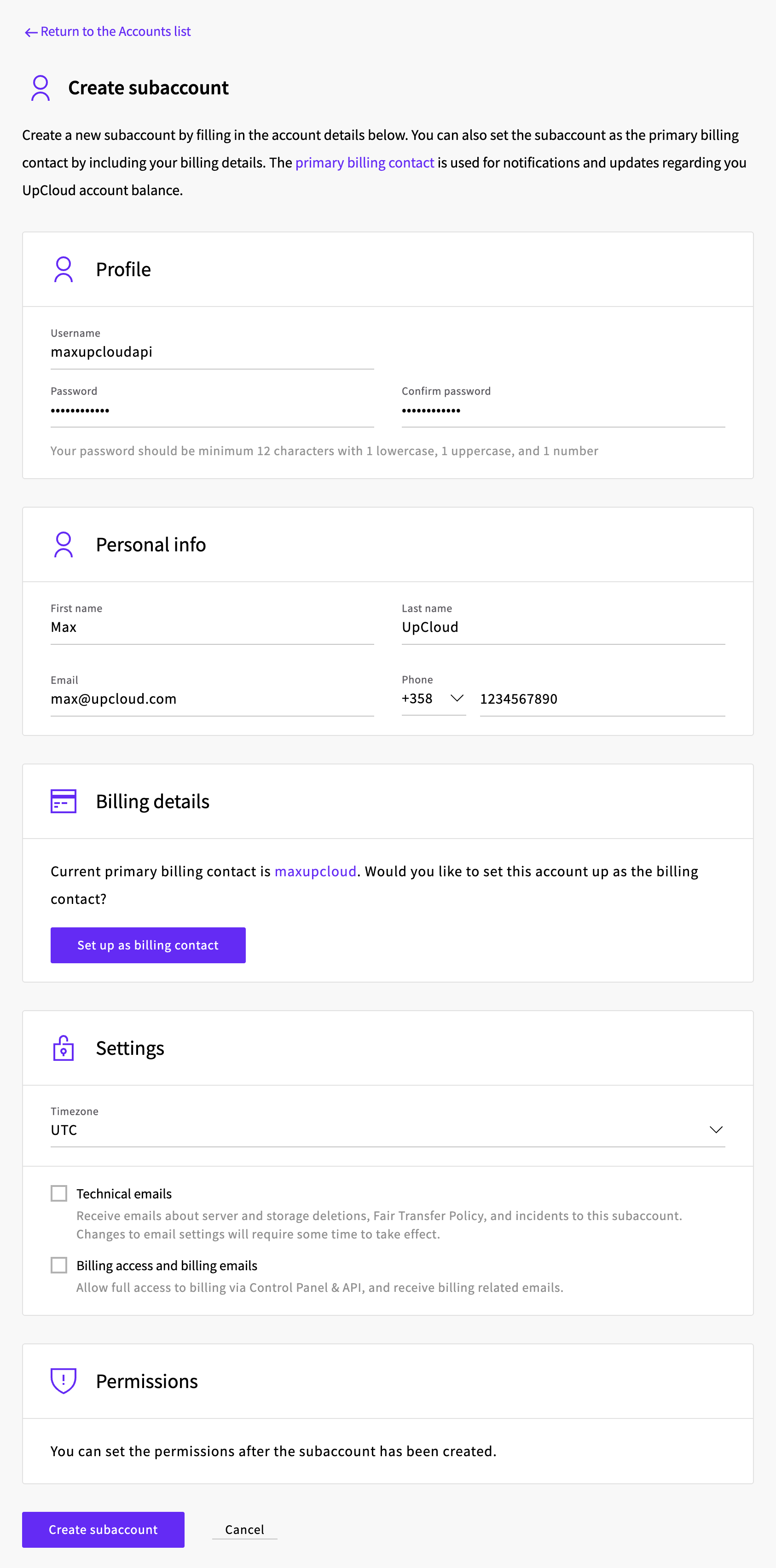
Create a new subaccount for the API access by clicking the Create subaccount button.

Enter the contact details for your API credentials and set the API password, then click the Create subaccount button at the bottom.
The new subaccount can't connect to the API until you allow it. Go to People → Permissions, click Edit permissions next to the subaccount, and turn on Allow Basic Auth API connections. An account that's only used for the API doesn't need Allow access to Control Panel, so you can leave it off.
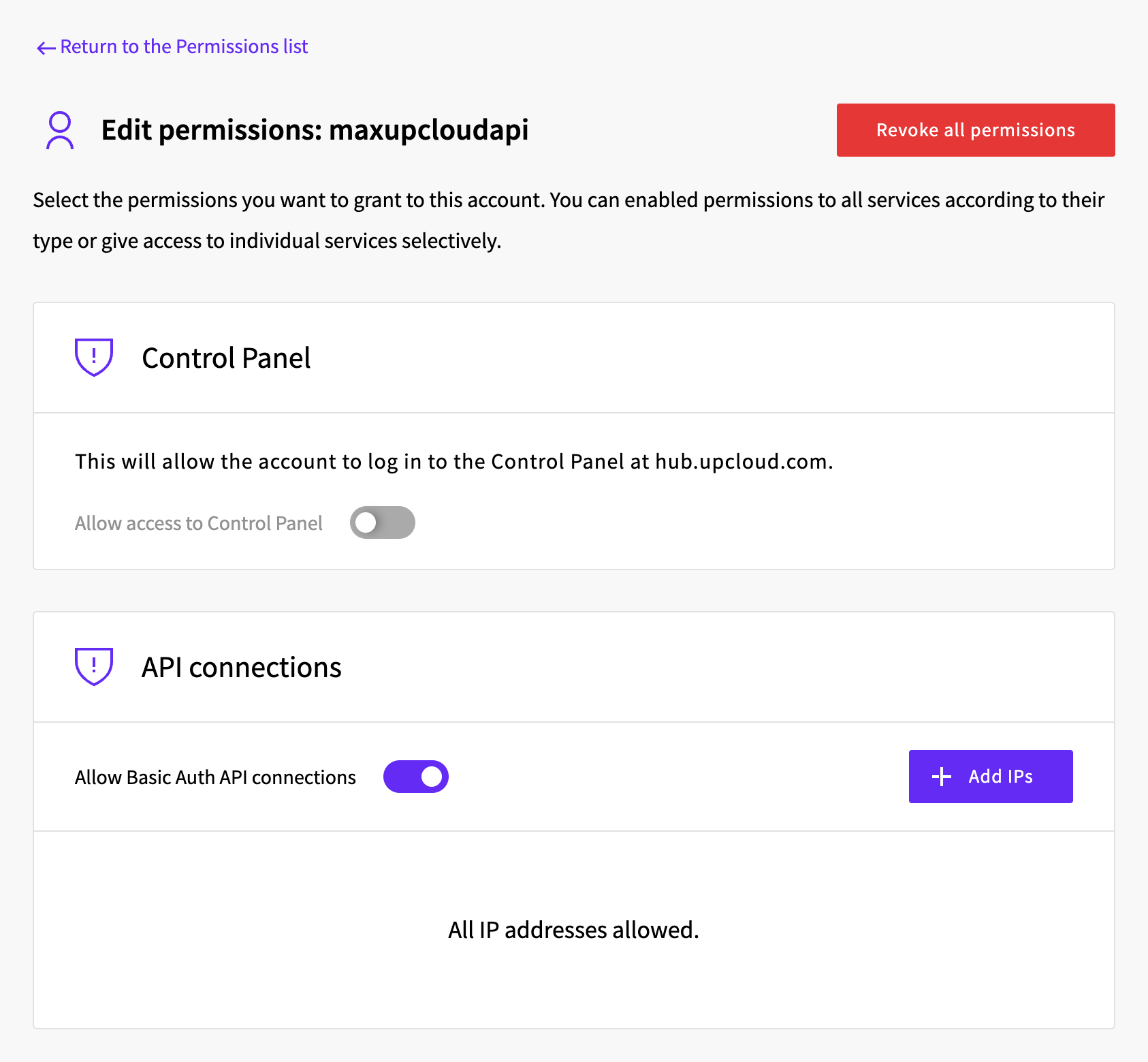
By default, the API account will have full permissions to any resources it creates but no access to existing servers or storage. You can grant additional permissions as needed using the server, storage, and tag access options.
You can create as many dedicated API accounts as you need. We recommend creating separate API credentials for each application and external service you use.
Note that you should restrict the API subaccount from your other UpCloud services. Take care handling the credentials if you are programming automation against the UpCloud API.
Running basic API requests
Once you have created your API account, let's try your first request. To quickly test the API, use an API client such as Bruno, which is free and open source, or any other API toolkit of your choice. The goal is to have the following dialogue working.
GET /1.3/account{
"account" : {
"resource_limits" : {
"cdns" : 100,
...
},
"username" : "username"
}
}Bruno keeps requests in collections, so start by creating one with Create Collection. Then right-click the collection, select New Request, give the request a name, and enter the API address https://api.upcloud.com with the API version number and the desired command as the URL, for example https://api.upcloud.com/1.3/account. On the request's Auth tab, select Basic Auth and enter the subaccount's username and password. When you have filled in the request details, click Send to run the query.
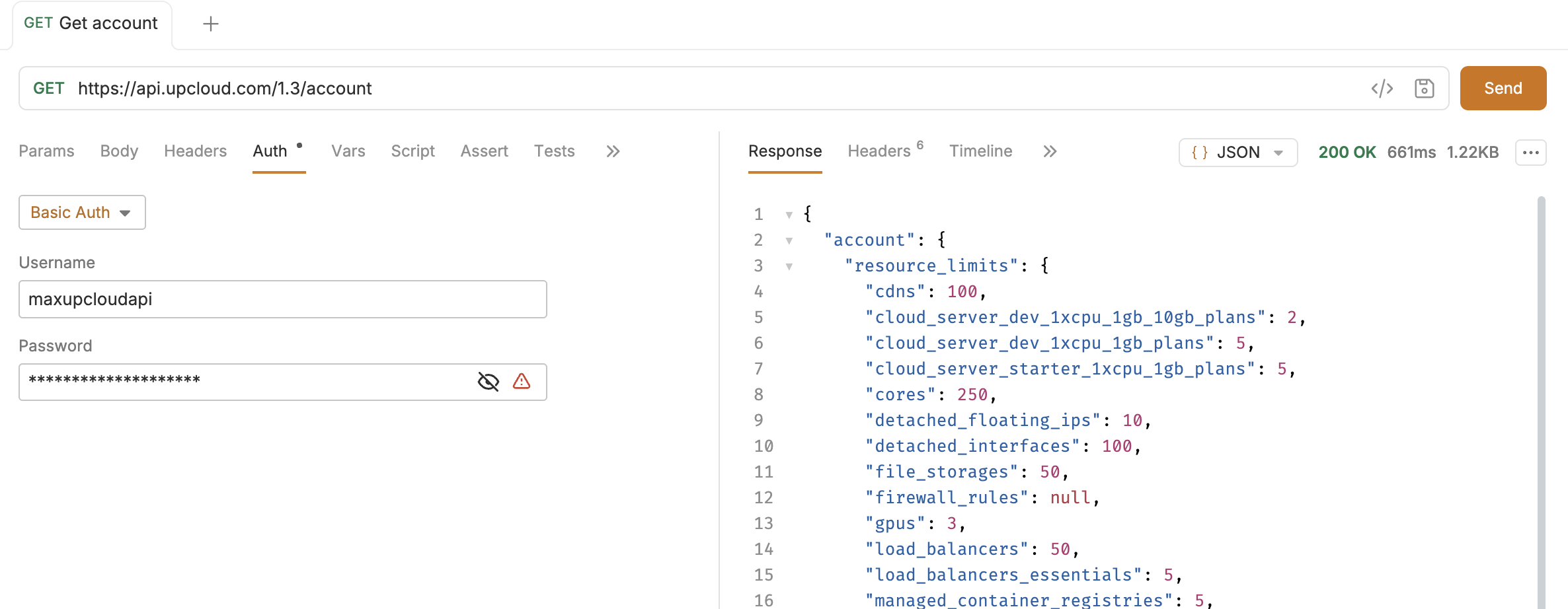
The reply is shown in the Response pane on the right. The warning icon next to the password is Bruno's reminder to store sensitive values as a secret variable or in a .env file rather than in the request itself, which is worth doing if you keep the collection.
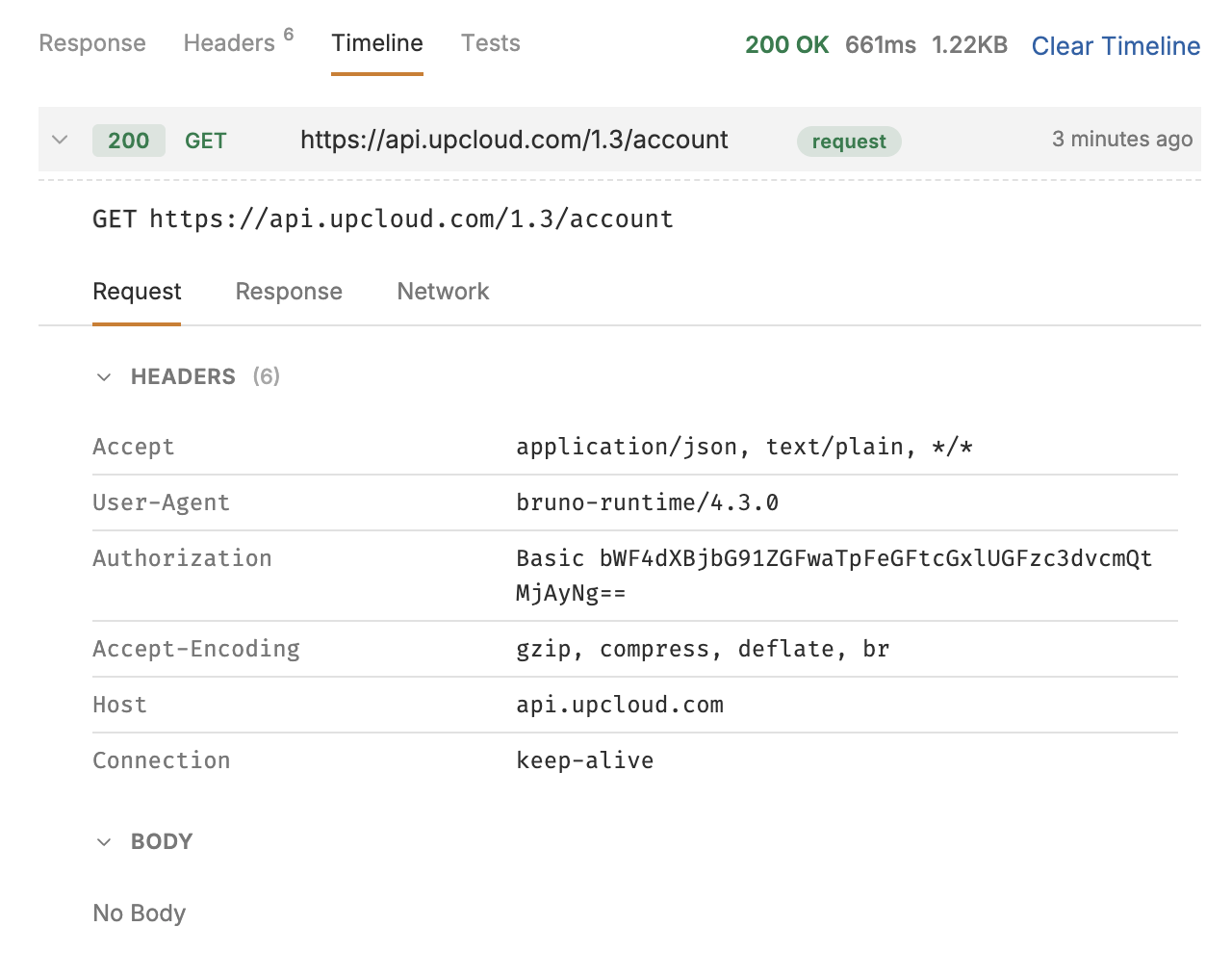
The authentication method here is HTTP Basic authentication, where the Authorization header should contain your subaccount's username and password Base64 encoded. More precisely:
# Python3
import base64
base64.b64encode("username:password".encode())
// Node.js
Buffer.from("username:password").toString("base64");To see the header Bruno sent, open the Timeline tab in the response pane and click the request to expand it. The Authorization header should look as shown below, with your Base64-encoded credentials.
Using a similar request by just replacing the query target from account to server you can get the full list of servers your API account is allowed to access. A new API account only sees the servers it has created itself, so the list stays empty until it creates one.
GET /1.3/server{
"servers" : {
"server" : [
{
"core_number" : "1",
"created" : 1793265189,
...
"hostname" : "example.upcloud.com",
...
"memory_amount" : "1024",
"plan" : "PREMIUM-1xCPU-1GB",
...
"state" : "started",
"tags" : {
"tag" : []
},
"title" : "Example UpCloud server",
"uuid" : "00f868a7-09f4-42a9-8a36-58f3678b34ea",
"zone" : "fi-hel1"
}
]
}
}You should now be able to form similar requests to the ones above using the API. For example, GET /1.3/server/00f868a7-09f4-42a9-8a36-58f3678b34ea, will reply with full details of that specific host when you include the UUID of one of your servers in a query.
Using the API programmatically
The API can be accessed using any language that has proper HTTP libraries. The following snippet shows how you could take advantage of the UpCloud API using Python3 with Base64-encoded subaccount credentials.
import http.client
import base64

conn = http.client.HTTPSConnection("api.upcloud.com")
auth = base64.b64encode("username:password".encode())
headers = {"Authorization": "Basic " + auth.decode()}

conn.request("GET", "/1.3/account", None, headers)
res = conn.getresponse()
print( res.read().decode() )
For a bit more sensible approach, the example below shows how you could structure the code for a better approach. The BaseAPI forms a generic API (GET) request that is extended by the Account class to form the same API request as above. Adding additional GET requests would now be much easier.
import http.client
import base64

class BaseAPI:
    api = "api.upcloud.com"
    api_v = "1.3"
    token = base64.b64encode("username:password".encode())

    '''
    Performs a GET request to a given endpoint in UpCloud's API.
    '''
    def get(self, endpoint):
        conn = http.client.HTTPSConnection(self.api)
        url = "/" + self.api_v + endpoint
        headers = {
            "Authorization": "Basic " + self.token.decode(),
            "Content-Type": "application/json"
        }
        conn.request("GET", url, None, headers)
        res = conn.getresponse()
        self.printresponse(res.read())

    '''
    Prints the response (bytes) as a string to the user
    '''
    def printresponse(self, res):
        data = res.decode(encoding="UTF-8")
        print(data)

class Account(BaseAPI):
    endpoint="/account"

    def do(self):
        self.get(self.endpoint)

if __name__ == "__main__":
    Account().do()
More about the UpCloud API
These are just a couple of the simplest examples of what the UpCloud API allows you to do. Now that you have got the hang of the API usage, continue on to deploying a new server with UpCloud API.