How to index and search data in Managed OpenSearch
When your application needs search, for example a search box in an online shop, you store its records in Managed OpenSearch as documents in an index. OpenSearch then finds the documents by the words they contain. It can also filter, sort and count them.
This guide shows how to do that for a small product catalogue. You'll create an index for the products and add them one at a time and in bulk. Then you'll search them, change and delete some of them, and load more from a CSV file with a short Python program.
Before you start
You need:
- A Managed OpenSearch service, and a computer with
curlthat can connect to it. How to get started with Managed OpenSearch shows how to create the service and send it requests. - For the Python section, opensearch-py in a virtual environment, set up as in How to get started with Managed OpenSearch.
The requests go to the OpenSearch API on the Managed OpenSearch service, so take the host and port from the service's connection details. In every request, --user upadmin makes curl ask for the password.
How indexing works
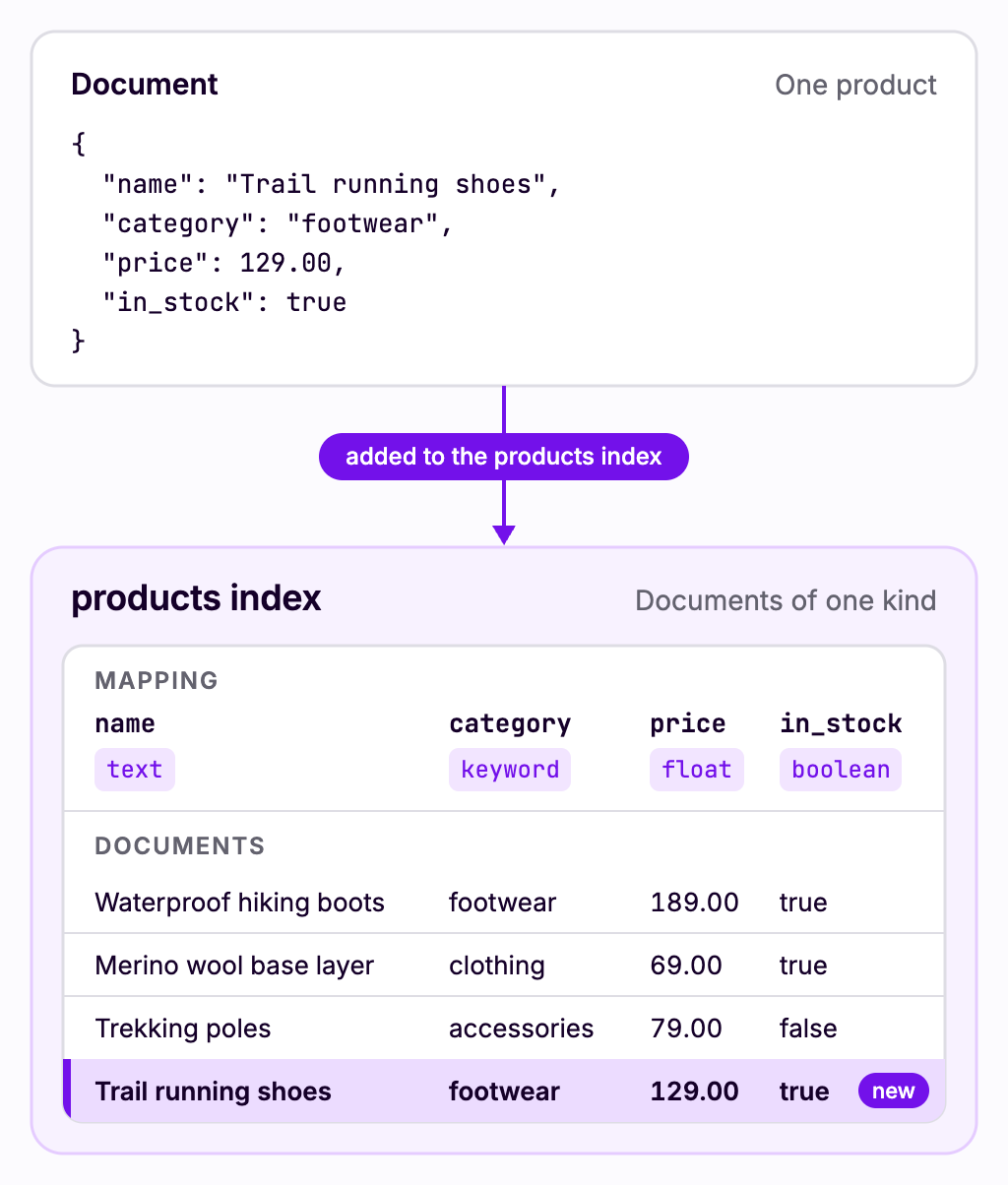
An index holds documents of one kind, much like a table holds rows. A document is a JSON object, such as one product.
The index's mapping sets the type of each field, and the type decides how you can search the field:
- A
textfield is split into words, so a search for "waterproof" finds a description that contains it anywhere. - A
keywordfield is matched only as a whole value, which suits categories, tags and IDs. You can also sort by it and count its values. - A number field, such as a price, can be filtered by range and sorted. A
booleanfield can be filtered by its value.
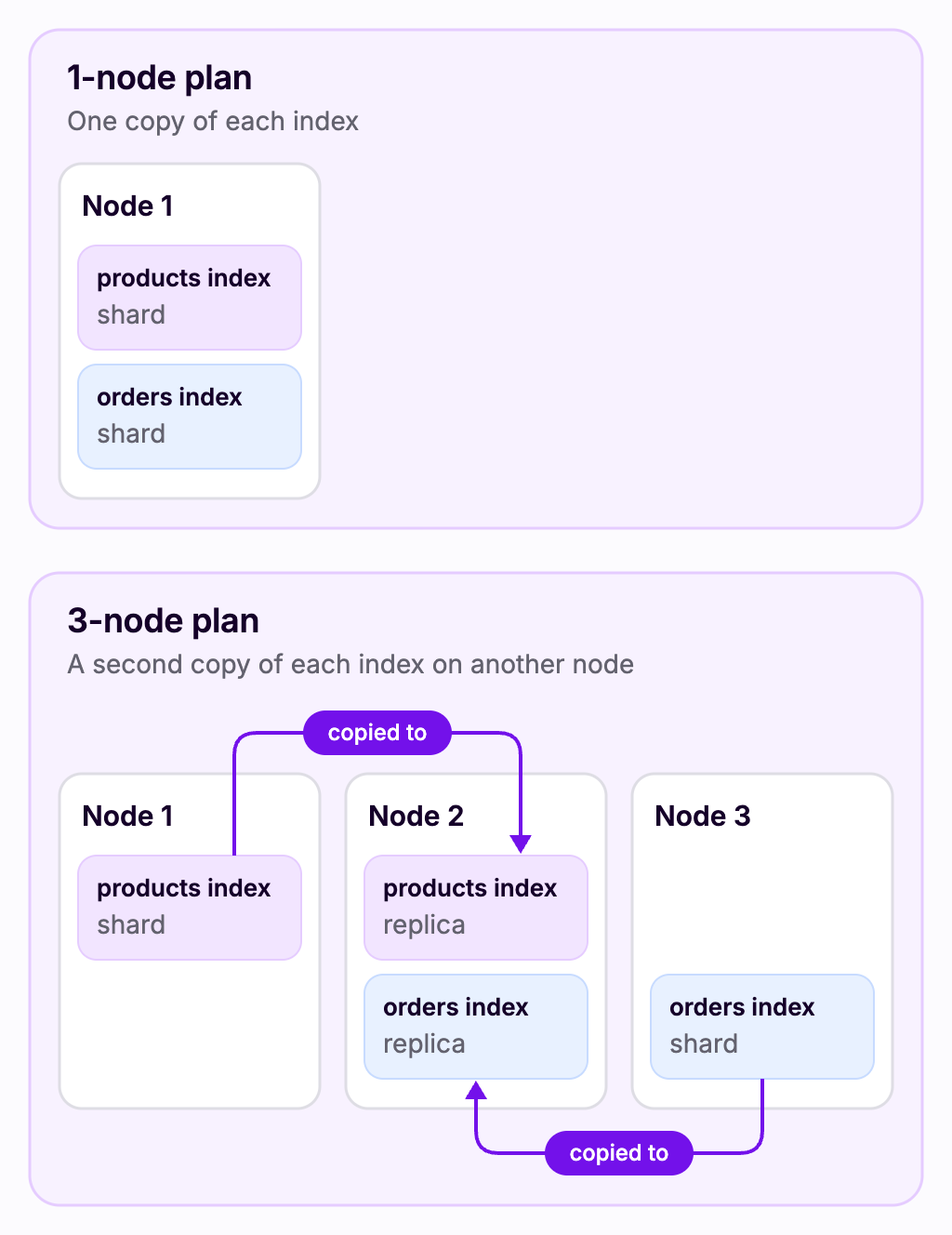
The Managed OpenSearch service keeps each new index in one shard. On plans with 3 or more nodes, the index also gets a replica, a copy of the shard on another node. On 1-node plans, it doesn't. If a node fails, the index is still available from its copy on another node. Managed OpenSearch high availability explains how the service handles a failed node.
Create an index
Create an index named products with a field for each part of a product. Index names must be lowercase.
curl --user upadmin -X PUT "https://<hostname>:<port>/products?pretty" -H 'Content-Type: application/json' -d '
{
  "mappings": {
    "properties": {
      "name":        { "type": "text" },
      "description": { "type": "text" },
      "category":    { "type": "keyword" },
      "price":       { "type": "float" },
      "in_stock":    { "type": "boolean" }
    }
  }
}'Enter host password for user 'upadmin':
{
"acknowledged" : true,
"shards_acknowledged" : true,
"index" : "products"
}You can also add documents to an index that doesn't exist yet. OpenSearch then creates the index and guesses each field's type from the first value it sees, and a string becomes a text field with a keyword copy. Setting the mapping yourself makes sure that each field is searched the way you need. A field's type can't be changed once the index has it.
Add a document
Add the first product. The 1 at the end of the URL is its ID:
curl --user upadmin -X PUT "https://<hostname>:<port>/products/_doc/1?filter_path=result&pretty" -H 'Content-Type: application/json' -d '
{
  "name": "Trail running shoes",
  "description": "Light, cushioned shoes with grippy soles for running on rough trails.",
  "category": "footwear",
  "price": 129.00,
  "in_stock": true
}'Enter host password for user 'upadmin':
{
"result" : "created"
}Adding a document with an ID that's already in the index replaces that document. Read the product back by its ID:
curl --user upadmin "https://<hostname>:<port>/products/_doc/1?filter_path=_source&pretty"Enter host password for user 'upadmin':
{
"_source" : {
"name" : "Trail running shoes",
"description" : "Light, cushioned shoes with grippy soles for running on rough trails.",
"category" : "footwear",
"price" : 129.0,
"in_stock" : true
}
}Add documents in bulk
The bulk API adds many documents in one request. Save the rest of the catalogue as products.ndjson. Each product takes two lines: an action with the product's ID, then the product itself. The file must end with a newline.
{ "index": { "_id": "2" } }
{ "name": "Waterproof hiking boots", "description": "Leather boots with a waterproof membrane and ankle support for rough trails.", "category": "footwear", "price": 189.00, "in_stock": true }
{ "index": { "_id": "3" } }
{ "name": "Lightweight rain jacket", "description": "A waterproof, breathable jacket that packs into its own pocket.", "category": "clothing", "price": 99.00, "in_stock": true }
{ "index": { "_id": "4" } }
{ "name": "Merino wool base layer", "description": "A soft long-sleeve top that keeps you warm on cold hikes.", "category": "clothing", "price": 69.00, "in_stock": true }
{ "index": { "_id": "5" } }
{ "name": "Two-person backpacking tent", "description": "A lightweight tent with a waterproof flysheet for hiking and camping trips.", "category": "camping", "price": 349.00, "in_stock": true }
{ "index": { "_id": "6" } }
{ "name": "Down sleeping bag", "description": "A warm sleeping bag for camping down to minus five degrees.", "category": "camping", "price": 259.00, "in_stock": false }
{ "index": { "_id": "7" } }
{ "name": "Insulated water bottle", "description": "Keeps drinks cold for a day of hiking or hot for a cold morning.", "category": "accessories", "price": 29.00, "in_stock": true }
{ "index": { "_id": "8" } }
{ "name": "Rechargeable headlamp", "description": "A bright headlamp for camping and early starts on the trail.", "category": "accessories", "price": 39.00, "in_stock": true }
{ "index": { "_id": "9" } }
{ "name": "40-litre hiking backpack", "description": "A comfortable backpack for day hikes and weekend trips.", "category": "bags", "price": 149.00, "in_stock": true }
{ "index": { "_id": "10" } }
{ "name": "Trekking poles", "description": "Lightweight aluminium poles that take the strain off your knees on steep trails.", "category": "accessories", "price": 79.00, "in_stock": false }
Send the file to the bulk API:
curl --user upadmin -X POST "https://<hostname>:<port>/products/_bulk?refresh=true&filter_path=errors&pretty" -H 'Content-Type: application/x-ndjson' --data-binary @products.ndjsonEnter host password for user 'upadmin':
{
"errors" : false
}--data-binary sends the file exactly as it is, line breaks included. refresh=true makes the new documents searchable straight away. When errors is true, leave out filter_path to see the result of each document.
Check that the index now holds all ten products:
curl --user upadmin "https://<hostname>:<port>/products/_count?filter_path=count&pretty"Enter host password for user 'upadmin':
{
"count" : 10
}Search the index
Searches go to the index's _search endpoint, with the query in the request body. The examples use filter_path to keep only the parts of each result that matter here.
Search for words
A match query searches one field for words:
curl --user upadmin "https://<hostname>:<port>/products/_search?filter_path=hits.hits._score,hits.hits._source.name&pretty" -H 'Content-Type: application/json' -d '
{
  "query": {
    "match": { "description": "waterproof" }
  }
}'Enter host password for user 'upadmin':
{
"hits" : {
"hits" : [
{
"_score" : 0.5498547,
"_source" : {
"name" : "Lightweight rain jacket"
}
},
{
"_score" : 0.51141834,
"_source" : {
"name" : "Waterproof hiking boots"
}
},
{
"_score" : 0.51141834,
"_source" : {
"name" : "Two-person backpacking tent"
}
}
]
}
}Each hit has a _score for how well it matches, and the best matches come first.
To search several fields at once, use multi_match. A product matches when any of the words appears in any of the fields:
curl --user upadmin "https://<hostname>:<port>/products/_search?filter_path=hits.hits._source.name&pretty" -H 'Content-Type: application/json' -d '
{
  "query": {
    "multi_match": {
      "query": "lightweight hiking",
      "fields": ["name", "description"]
    }
  }
}'Enter host password for user 'upadmin':
{
"hits" : {
"hits" : [
{
"_source" : {
"name" : "Two-person backpacking tent"
}
},
{
"_source" : {
"name" : "Lightweight rain jacket"
}
},
{
"_source" : {
"name" : "Waterproof hiking boots"
}
},
{
"_source" : {
"name" : "Trekking poles"
}
},
{
"_source" : {
"name" : "Insulated water bottle"
}
},
{
"_source" : {
"name" : "40-litre hiking backpack"
}
}
]
}
}The tent, whose description contains both words, comes first.
Filter and sort
A bool query combines a search with filters. The search goes under must and decides the score. Filters go under filter and only include or exclude products. This one finds products for hiking that cost up to 150 and are in stock:
curl --user upadmin "https://<hostname>:<port>/products/_search?filter_path=hits.hits._source.name,hits.hits._source.price&pretty" -H 'Content-Type: application/json' -d '
{
  "query": {
    "bool": {
      "must": {
        "multi_match": { "query": "hiking", "fields": ["name", "description"] }
      },
      "filter": [
        { "range": { "price": { "lte": 150 } } },
        { "term": { "in_stock": true } }
      ]
    }
  }
}'Enter host password for user 'upadmin':
{
"hits" : {
"hits" : [
{
"_source" : {
"name" : "Insulated water bottle",
"price" : 29.0
}
},
{
"_source" : {
"name" : "40-litre hiking backpack",
"price" : 149.0
}
}
]
}
}The boots and the tent mention hiking too, but they cost more than 150.
To list products in a fixed order instead, add sort. size sets how many results to return. This lists the two cheapest accessories, with a term query that matches the category exactly:
curl --user upadmin "https://<hostname>:<port>/products/_search?filter_path=hits.hits._source.name,hits.hits._source.price&pretty" -H 'Content-Type: application/json' -d '
{
  "query": { "term": { "category": "accessories" } },
  "sort": [ { "price": "asc" } ],
  "size": 2
}'Enter host password for user 'upadmin':
{
"hits" : {
"hits" : [
{
"_source" : {
"name" : "Insulated water bottle",
"price" : 29.0
}
},
{
"_source" : {
"name" : "Rechargeable headlamp",
"price" : 39.0
}
}
]
}
}Count by category
An aggregation summarizes the products instead of listing them. This one counts the products in each category and works out their average price. "size": 0 leaves out the products themselves:
curl --user upadmin "https://<hostname>:<port>/products/_search?filter_path=aggregations.categories.buckets&pretty" -H 'Content-Type: application/json' -d '
{
  "size": 0,
  "aggs": {
    "categories": {
      "terms": { "field": "category" },
      "aggs": {
        "average_price": { "avg": { "field": "price" } }
      }
    }
  }
}'Enter host password for user 'upadmin':
{
"aggregations" : {
"categories" : {
"buckets" : [
{
"key" : "accessories",
"doc_count" : 3,
"average_price" : {
"value" : 49.0
}
},
{
"key" : "camping",
"doc_count" : 2,
"average_price" : {
"value" : 304.0
}
},
{
"key" : "clothing",
"doc_count" : 2,
"average_price" : {
"value" : 84.0
}
},
{
"key" : "footwear",
"doc_count" : 2,
"average_price" : {
"value" : 159.0
}
},
{
"key" : "bags",
"doc_count" : 1,
"average_price" : {
"value" : 149.0
}
}
]
}
}
}This works because category is a keyword field. Counting the values of a text field needs a keyword copy of it.
Update and delete documents
To change some fields of a document, send them to the _update endpoint. The sleeping bag is back in stock:
curl --user upadmin -X POST "https://<hostname>:<port>/products/_update/6?filter_path=result&pretty" -H 'Content-Type: application/json' -d '
{
  "doc": { "in_stock": true }
}'Enter host password for user 'upadmin':
{
"result" : "updated"
}To delete a document, send a DELETE request with its ID. The trekking poles are no longer sold:
curl --user upadmin -X DELETE "https://<hostname>:<port>/products/_doc/10?filter_path=result&pretty"Enter host password for user 'upadmin':
{
"result" : "deleted"
}Load documents from an application
Records often start in a file or another database. This example loads five more products from a CSV file with opensearch-py's bulk helper, which sends them in bulk requests instead of one request per product.
Save the products as new-products.csv:
id,name,description,category,price,in_stock
11,Hiking socks,Cushioned merino socks that stay dry on long hikes.,clothing,19.00,true
12,Camping stove,A compact gas stove for cooking on camping trips.,camping,59.00,true
13,Waterproof stuff sacks,A set of three bags that keep your gear dry.,bags,35.00,true
14,Fleece jacket,A warm fleece jacket for cool evenings at camp.,clothing,89.00,false
15,Map case,A waterproof case that keeps your map readable in the rain.,accessories,25.00,true
Save this program as load.py. It reads the connection string from an environment variable, turns each row into a product with the right types, and sends them all with helpers.bulk:
import csv
import os

from opensearchpy import OpenSearch, helpers

client = OpenSearch(os.environ["OPENSEARCH_URL"])


def actions():
    with open("new-products.csv", newline="") as file:
        for row in csv.DictReader(file):
            yield {
                "_index": "products",
                "_id": row["id"],
                "_source": {
                    "name": row["name"],
                    "description": row["description"],
                    "category": row["category"],
                    "price": float(row["price"]),
                    "in_stock": row["in_stock"] == "true",
                },
            }


added, errors = helpers.bulk(client, actions(), refresh=True)
print(f"Added {added} products")
Run it with your connection string in OPENSEARCH_URL, in the virtual environment where you installed opensearch-py:
export OPENSEARCH_URL='https://upadmin:<password>@<hostname>:<port>'
python load.pyAdded 5 productsThe index now holds 14 products: the ten from before, less the trekking poles, and the five new ones. Because the IDs come from the file, running the program again replaces the same five products instead of adding copies.
Delete the index
When you no longer need an index, delete it together with all of its documents:
curl --user upadmin -X DELETE "https://<hostname>:<port>/products?pretty"Enter host password for user 'upadmin':
{
"acknowledged" : true
}You have to name the index you delete. A pattern such as prod* is refused with Wildcard expressions or all indices are not allowed.
You can also delete an index in the Control Panel. The Managed OpenSearch service's Indices tab lists its indices with their health, shards, replicas and size, and Delete next to an index deletes it after you confirm.
Troubleshooting
resource_already_exists_exceptionwithindex [products/<id>] already existsThe index already exists. To start again with a different mapping, delete the index first.
index_not_found_exceptionwithno such index [<name>]The index name in the URL is wrong, or the index was deleted.
mapper_parsing_exceptionwithfailed to parse field [price] of type [float]A value doesn't fit the field's type, for example text in a number field. Fix the value in the document.
illegal_argument_exceptionwithmapper [price] cannot be changed from type [float] to [keyword]A field's type can't be changed in an existing index. Create a new index with the mapping you need and add the documents to it again.
Text fields are not optimised for operations that require per-document field data like aggregations and sortingThe aggregation or sort uses a
textfield. Use akeywordor number field instead, such ascategoryorprice.The bulk request must be terminated by a newline [\n]The bulk request's last line has no line break after it. Add a newline at the end of the file, and send it with
--data-binary, because-dremoves line breaks.Content-Type header [application/x-www-form-urlencoded] is not supportedThe request has a body but no
Content-Typeheader. Add-H 'Content-Type: application/json', orapplication/x-ndjsonfor the bulk API.
For connection problems, see How to get started with Managed OpenSearch.
Next steps
- How to use OpenSearch Dashboards with Managed OpenSearch shows how to search and chart the products in your browser, and how to send these requests from the Dev Tools console.
- Query DSL in the OpenSearch documentation describes every kind of query.
- Mappings in the OpenSearch documentation lists the field types and mapping options.
- Aggregations in the OpenSearch documentation covers the other ways to summarize data.
- Customisable Managed OpenSearch properties lists the service settings you can change with the API, such as whether indices are created automatically.