How to configure a custom domain for Managed Object Storage
A Managed Object Storage service has its own domain name, such as abcd1.upcloudobjects.com. With a custom domain, you can reach the service through a domain name of your own instead, such as assets.example.com. UpCloud gets a TLS certificate for the domain automatically. The domain then works as another endpoint for the service, so public files open at URLs on your domain and S3 tools such as the AWS CLI can connect through it.
This guide walks you through adding a custom domain for S3 access, using it, and removing it. To serve a website from a bucket on your own domain, see How to host a static website on UpCloud Object Storage instead.
Before you start
You need:
- A Managed Object Storage service with a bucket. To create them, see How to get started with UpCloud Managed Object Storage. The examples in this guide use the custom domain
assets.example.com, a service whose S3 endpoint isabcd1.upcloudobjects.com, and the bucketsite-assets. - A domain whose DNS records you can change. UpCloud doesn't host DNS, so you add the records at your DNS provider. For how DNS records work, see Domain Name System and how to manage DNS records.
- For the AWS CLI steps, the AWS CLI with the
upcloudprofile, as in How to get started with UpCloud Managed Object Storage.
Custom domains are reached over the service's public access, which is on by default. If your domain has CAA records, they must allow sectigo.com, as described in CAA records for automatically issued certificates.
Add the custom domain
A custom domain needs three CNAME records at your DNS provider. The first lets UpCloud get the domain's certificate. The other two send requests for the domain, and for names under it such as site-assets.assets.example.com, to the service. If your DNS provider is Cloudflare, set all three records to DNS only, because UpCloud can't get the certificate through proxied records.
Go to Object Storage, open the service and go to its Custom domains tab.
Click Add custom domain.
Enter your domain under Domain, select S3 API under Purpose, and click Next.
The window lists the three CNAME records. Add them at your DNS provider with the names and values shown. The copy icon next to each name and value copies it.
Click Verify DNS. Once the window says DNS records verified successfully., click Add.
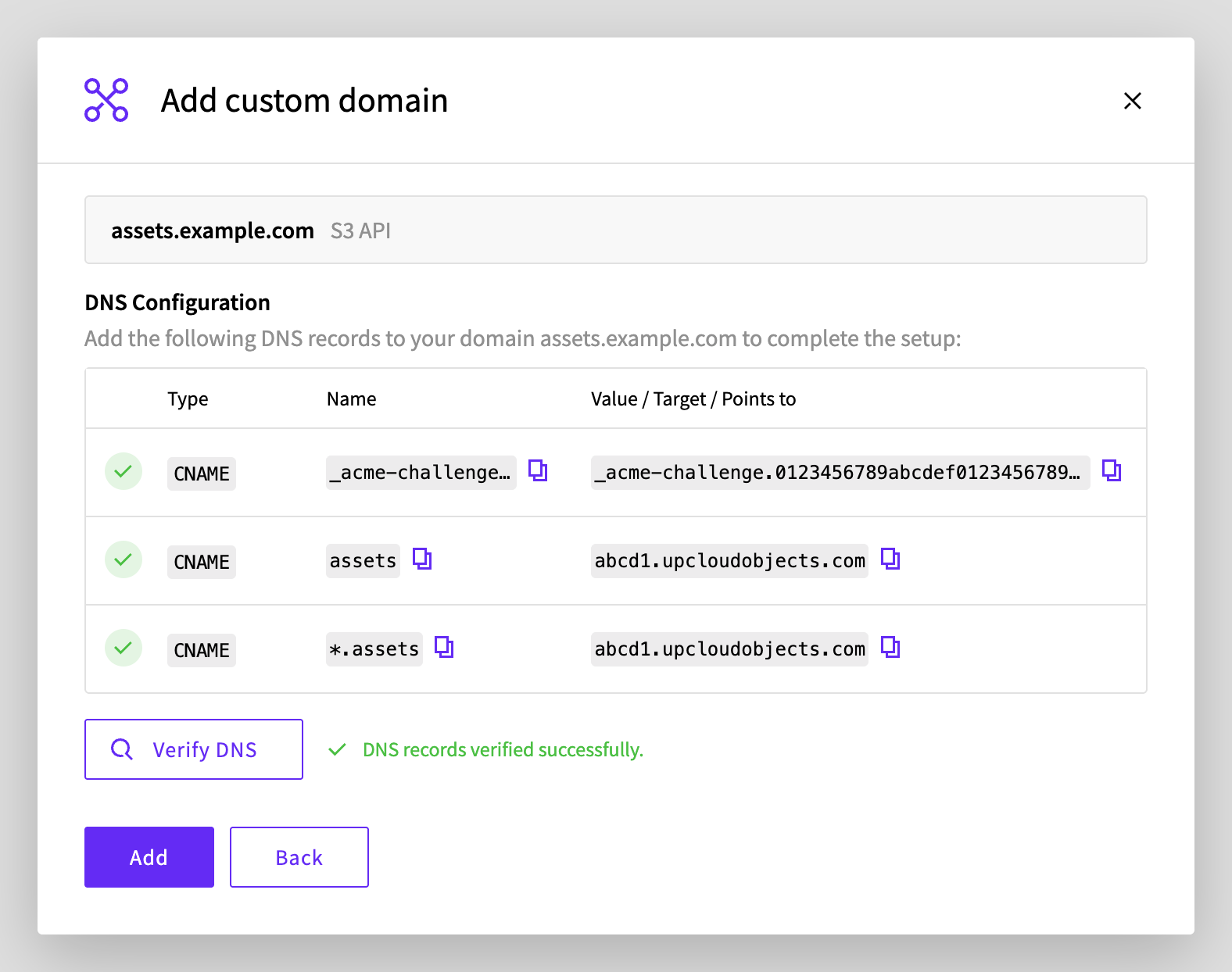
New records can take a while to appear. If Verify DNS can't find them yet, check them as described in Troubleshooting and try again. If you're sure that the records are right, you can also select I have added the DNS records but verification cannot detect them yet. and click Add. UpCloud then gets the certificate once the records can be found.
The domain appears in the list with the status Pending while UpCloud gets its certificate, and the service's status shows a setup step. The domain is ready to use once its status is Active and the service's status is Running again.
Open a file through the domain
Publicly readable files now have two URLs on your domain:
https://<domain>/<bucket-name>/<file-path>
https://<bucket-name>.<domain>/<file-path>
For example, the file images/logo.png in the bucket site-assets is at both of these URLs:
https://assets.example.com/site-assets/images/logo.png
https://site-assets.assets.example.com/images/logo.png
The second form doesn't work for bucket names that contain dots, so use the first form for those. To make files publicly readable, see How to set up a public read bucket.
Open one of the URLs in a browser, or check it with curl:
curl -I https://assets.example.com/site-assets/images/logo.pngHTTP/2 200
date: Wed, 28 Oct 2026 14:56:02 GMT
server: ViPR/1.0
...
content-type: image/png
content-length: 14Files that aren't publicly readable answer with an AccessDenied error. To reach them, use signed requests, as the AWS CLI does.
Use the domain with the AWS CLI
S3 tools can use the custom domain as their endpoint, for private files as well as public ones. To make the AWS CLI's upcloud profile use it, set the profile's endpoint to your domain:
aws configure set endpoint_url https://assets.example.com --profile upcloudThe profile's commands now go through your domain:
aws s3 ls s3://site-assets --profile upcloud PRE images/Pre-signed URLs that you create with the profile use your domain too:
aws s3 presign s3://site-assets/images/logo.png --profile upcloudhttps://assets.example.com/site-assets/images/logo.png?X-Amz-Algorithm=AWS4-HMAC-SHA256&X-Amz-Credential=...To use the service's own endpoint again, set endpoint_url back to it, for example https://abcd1.upcloudobjects.com. In other S3 tools and applications, enter https://assets.example.com as the S3 endpoint. The domain's IAM and STS endpoints are listed in Managed Object Storage custom domains and static websites.
Remove the custom domain
If the AWS CLI or other S3 tools use the domain as their endpoint, switch them back to the service's own endpoint first.
- On the service's Custom domains tab, click the bin icon on the domain's row.
- Click Delete.
Then delete the three DNS records at your DNS provider. Once the custom domain is removed, the service no longer has a certificate for it, so requests to the domain fail with certificate errors.
Troubleshooting
The domain stays Pending, or the service keeps going back to a setup status.
UpCloud can't get the domain's certificate. Check that all three records exist and point to the values that the Control Panel lists. Each of these commands should print the record's target:
dig +short CNAME _acme-challenge.assets.example.com
dig +short CNAME assets.example.com
dig +short CNAME test.assets.example.com
If the records are right, check your domain's CAA records, as described in CAA records for automatically issued certificates. Once the records are fixed, UpCloud tries again by itself, so you don't need to add the domain again.
curl: (60) SSL: no alternative certificate subject name matches target hostname 'assets.example.com'The domain doesn't have its certificate yet. Wait until its status is Active, or
"status": "active"in the API. If it stays Pending, check the records as above.Cannot add 'assets.example.com': conflicts with a domain on another service (parent/subdomain conflict).An S3 API domain can't be the parent or a subdomain of another custom domain, on any of your services. For example,
assets.example.comcan't be added whileexample.comorcdn.assets.example.comis a custom domain. Use a domain outside that family, or remove the other domain first. On the same service, the message ends inparent/subdomain hierarchy conflict with an API-mode domain.instead.AccessDeniedwhen you open a file's URLThe file isn't publicly readable. Make it publicly readable as described in How to set up a public read bucket, or download it with the AWS CLI.
Next steps
- How to set up a public read bucket explains how to make files publicly readable.
- How to host a static website on UpCloud Object Storage explains how to serve a website from a bucket, on your own domain or the service's.
- Managed Object Storage custom domains and static websites describes the DNS records, certificates and limits in detail.