UpCloud Managed Container Registry is in beta. Features shown in this guide may change before general availability.
How to store OpenTofu modules and other files in Container Registry
Beta notice
UpCloud Managed Container Registry can store more than container images. Any file can go into it as an OCI artifact, so configuration bundles, release files, and infrastructure code can sit next to your images, behind the same registry users and permissions. OpenTofu can also install modules straight from the registry, which makes it a private module registry for your team.
This guide walks you through storing a file with the ORAS command-line tool, then publishing an OpenTofu module and using it in a configuration. It ends with releasing a new version of the module and using the module with Terraform.
Before you start
You need:
- A registry and a registry user with the Create permission, such as the
app-developeruser from How to get started with UpCloud Container Registry. - The ORAS CLI on your workstation. ORAS is an open-source tool for pushing files to OCI registries and pulling them back.
- For the module part, OpenTofu 1.10 or later, and an UpCloud API token. If you don't have a token yet, see How to create and use UpCloud API Tokens.
- The
zipandunzipcommands, which some Linux distributions don't install by default. On Ubuntu, install them withsudo apt install zip unzip.
The examples use the registry endpoint my-registry-1b77d021.upcloudcr.com. Replace it with your own, which is shown on the registry's Overview tab.
Log in with ORAS
ORAS logs in to the registry the same way Docker does. Log in as your registry user, and enter its password when prompted:
oras login my-registry-1b77d021.upcloudcr.com -u app-developerOutput
Password:
Login Succeeded
ORAS saves the login in ~/.docker/config.json, the file Docker uses, whether or not Docker is installed. With Docker Desktop, the login goes to Docker Desktop's credential store instead. OpenTofu reads the login from the same place, so you only need to log in once.
Store a file
You can store any file in the registry, for example a configuration bundle that your servers download when they start. Create an example file called app-config.yaml:
# Settings for the web app
log_level: info
feature_flags:
  new_checkout: true
Like an image, the file goes into a repository with a tag. The following command pushes it to the files/app-config repository with the tag 2026-11. The part after the file name, application/yaml, is the file's media type, which tells other tools what kind of file it is:
oras push my-registry-1b77d021.upcloudcr.com/files/app-config:2026-11 app-config.yaml:application/yamlOutput
...
Pushed [registry] my-registry-1b77d021.upcloudcr.com/files/app-config:2026-11
ArtifactType: application/vnd.unknown.artifact.v1
Digest: sha256:c606f03a901a694b5ca3552fd41651b0cef34071da83f7d524e3b85d298a0154
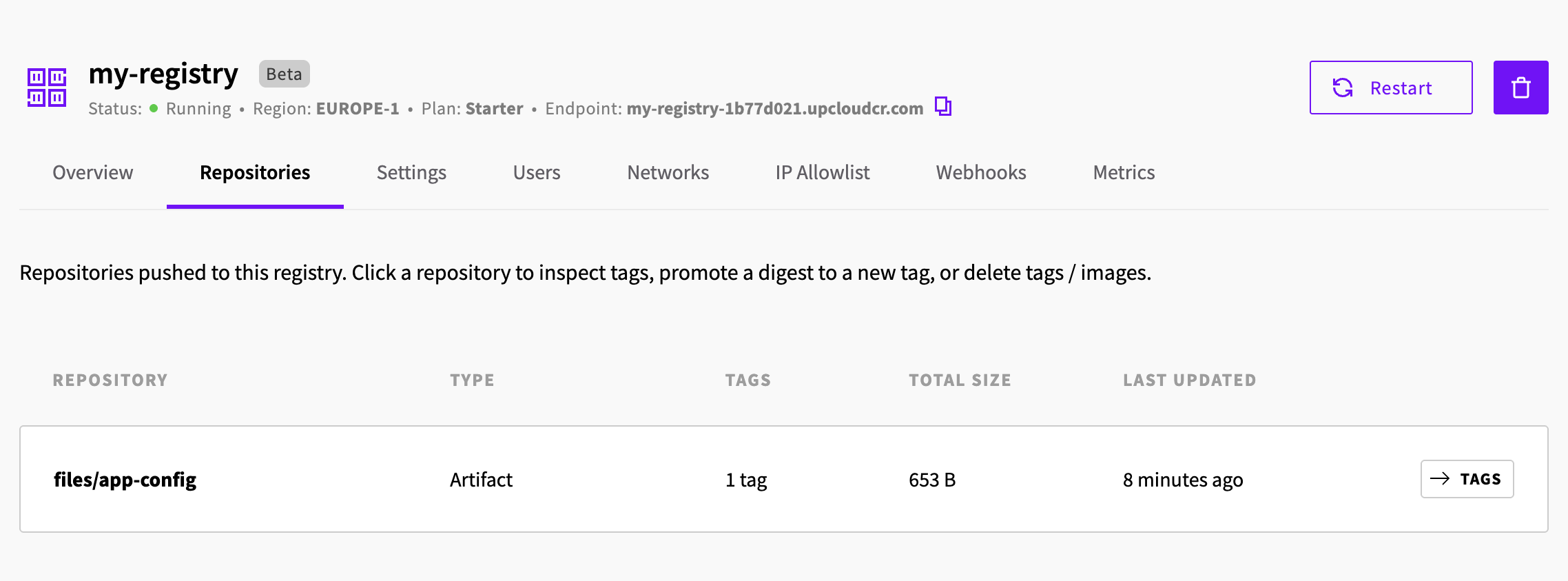
The repository now shows on the registry's Repositories tab with the type Artifact. You manage its tags there the same way as an image's, as described in How to get started with UpCloud Container Registry.
To download the file, for example on a server that uses it, pull it into a directory:
oras pull my-registry-1b77d021.upcloudcr.com/files/app-config:2026-11 -o configOutput
...
Pulled [registry] my-registry-1b77d021.upcloudcr.com/files/app-config:2026-11
Digest: sha256:c606f03a901a694b5ca3552fd41651b0cef34071da83f7d524e3b85d298a0154
ORAS saves the file under its original name, so it's now in config/app-config.yaml.
Publish an OpenTofu module
For OpenTofu to install a module from the registry, the module must be a zip file of its directory, pushed with a type that marks it as a module package. As an example, create a module that sets up an SDN Private Network with an SDN Router, in a directory called modules/network.
modules/network/main.tf creates the router and the network:
terraform {
  required_providers {
    upcloud = {
      source = "UpCloudLtd/upcloud"
    }
  }
}

resource "upcloud_router" "this" {
  name = "${var.name}-router"
}

resource "upcloud_network" "this" {
  name   = "${var.name}-network"
  zone   = var.zone
  router = upcloud_router.this.id

  ip_network {
    address = var.cidr
    dhcp    = true
    family  = "IPv4"
  }
}
modules/network/variables.tf defines the module's inputs:
variable "name" {
  description = "Prefix for the network and router names"
  type        = string
}

variable "zone" {
  description = "Location of the network"
  type        = string
  default     = "fi-hel2"
}

variable "cidr" {
  description = "Address range of the network"
  type        = string
  default     = "10.10.0.0/24"
}
modules/network/outputs.tf returns the network's UUID:
output "network_id" {
  value = upcloud_network.this.id
}
OpenTofu reads the module from the top level of the zip file, so zip the files from inside the module's directory:
(cd modules/network && zip -r ../../network.zip .)Then push the zip file as version 1.0.0 of the modules/network repository. Use the artifact type application/vnd.opentofu.modulepkg and the media type archive/zip exactly as shown, because OpenTofu checks them before it installs the module:
oras push my-registry-1b77d021.upcloudcr.com/modules/network:1.0.0 \
  --artifact-type application/vnd.opentofu.modulepkg \
  network.zip:archive/zip
Output
...
Pushed [registry] my-registry-1b77d021.upcloudcr.com/modules/network:1.0.0
ArtifactType: application/vnd.opentofu.modulepkg
Digest: sha256:40d7d5a34aac41e697a03d1ed9ed1f21733bbb07d8cbcef1badd3be84c5c6037
Use the module in a configuration
To use the module, create an OpenTofu configuration in a new directory. provider.tf sets up the UpCloud provider:
terraform {
  required_providers {
    upcloud = {
      source  = "UpCloudLtd/upcloud"
      version = "~> 5.49"
    }
  }
}

provider "upcloud" {}
The UpCloud provider reads your API token from the UPCLOUD_TOKEN environment variable, so set it in the terminal you run OpenTofu from:
export UPCLOUD_TOKEN=ucat_Your_API_Tokenmain.tf uses the module from the registry. The oci:// address points to the module's repository, and ?tag=1.0.0 picks the version:
module "network" {
  source = "oci://my-registry-1b77d021.upcloudcr.com/modules/network?tag=1.0.0"

  name = "prod"
}

output "network_id" {
  value = module.network.network_id
}
For an oci:// source, the tag is the only way to choose a version, so leave out the module block's version argument.
Run tofu init to download the module and the provider. OpenTofu logs in to the registry with the credentials that ORAS saved:
tofu initOutput
Initializing the backend...
Initializing modules...
Downloading oci://my-registry-1b77d021.upcloudcr.com/modules/network?tag=1.0.0 for network...
- network in .terraform/modules/network

Initializing provider plugins...
- Finding upcloudltd/upcloud versions matching "~> 5.49"...
- Installing upcloudltd/upcloud v5.49.0...
...
OpenTofu has been successfully initialized!
...
From here on, the module works like any other. tofu plan shows the router and the network it creates, and tofu apply creates them:
tofu planOutput
...
  # module.network.upcloud_network.this will be created
...
  # module.network.upcloud_router.this will be created
...
Plan: 2 to add, 0 to change, 0 to destroy.
...
The example creates a real network and router, so when you no longer need them, remove them with tofu destroy.
Release a new version
When you change the module, push it again with a new tag, so that configurations move to the new version only when you choose. With ORAS, pushing to a tag that already exists needs the Update permission, even if the file hasn't changed.
For example, to release version 1.1.0 with an output for the router's UUID, add the output to modules/network/outputs.tf. Then zip the module again and push it, deleting the old zip file first so that the new one only contains the module's current files:
rm network.zip
(cd modules/network && zip -r ../../network.zip .)
oras push my-registry-1b77d021.upcloudcr.com/modules/network:1.1.0 \
  --artifact-type application/vnd.opentofu.modulepkg \
  network.zip:archive/zip
Output
...
Pushed [registry] my-registry-1b77d021.upcloudcr.com/modules/network:1.1.0
ArtifactType: application/vnd.opentofu.modulepkg
Digest: sha256:d4ff296a5437cb5bd836ae0c4d0663867a743ccf8f00fe80edde0927e8d3e8d1
Configurations keep using 1.0.0 until you change the tag in their source. Change it to ?tag=1.1.0, and run tofu init again to download the new version:
Output
...
Initializing modules...
Downloading oci://my-registry-1b77d021.upcloudcr.com/modules/network?tag=1.1.0 for network...
- network in .terraform/modules/network
...
A registry user with the Update permission can push a different module to an existing tag. To make sure a configuration always gets the same module, use the digest that oras push printed instead of the tag:
source = "oci://my-registry-1b77d021.upcloudcr.com/modules/network?digest=sha256:d4ff296a5437cb5bd836ae0c4d0663867a743ccf8f00fe80edde0927e8d3e8d1"A source address can have a tag or a digest, but not both.
Use the module with Terraform
Terraform can't install modules from an OCI registry, so with an oci:// source, terraform init stops with download not supported for scheme 'oci'. To use a module from your registry with Terraform, download it with ORAS and point Terraform to the local copy instead.
In your Terraform configuration's directory, pull the module into modules/network, then unzip it:
oras pull my-registry-1b77d021.upcloudcr.com/modules/network:1.1.0 -o modules/network
unzip modules/network/network.zip -d modules/network
rm modules/network/network.zip
Then use the directory as the module's source:
module "network" {
  source = "./modules/network"

  name = "prod"
}
terraform init now installs the module from the directory. To move to a new version, delete the modules/network directory, then pull and unzip the new version.
Troubleshooting
tofu init fails with basic credential not found.
OpenTofu found no login for the registry. Log in with oras login as the user that runs OpenTofu, as described in Log in with ORAS, and run tofu init again.
tofu init fails with unexpected artifact type "application/vnd.unknown.artifact.v1".
The module was pushed without --artifact-type application/vnd.opentofu.modulepkg. Push it again with the artifact type, as described in Publish an OpenTofu module.
tofu init fails with image manifest contains no layers of types supported as module packages by OpenTofu.
The zip file was pushed with a media type other than archive/zip, such as application/zip. Push it again with network.zip:archive/zip, as described in Publish an OpenTofu module.
terraform init fails with download not supported for scheme 'oci'.
Terraform can't install modules from an OCI registry. Download the module with ORAS instead, as described in Use the module with Terraform.