SDN Private Networks
Software-defined networking, or SDN for short, is a technological approach to network management that enables dynamic, programmatically created network configurations. SDN decouples the network configuration from the physical infrastructure much like cloud computing has done for traditional server hosting.
Using SDN Private Networks, users are able to create and configure custom private networks on demand.
SDN Private Networks are created within a specific data centre and allow connecting an unlimited number of cloud servers within that data centre.
SDN features
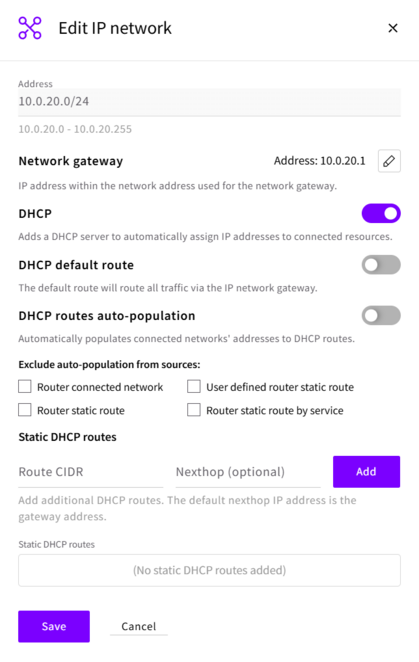
SDN Private Networks support the following features:
- Gateway IP: Setting a custom gateway IP address for your SDN Private Network. This allows for more advanced network configurations and integration with existing infrastructure.
- DHCP Control: Enable or disable the DHCP service on your SDN Private Network. This gives you finer control over IP address assignment for your connected Cloud Servers.
- Default route via DHCP: Configure whether the default route (0.0.0.0/0) is automatically set via DHCP for Cloud Servers connected to the SDN Private Network. This simplifies network setup and ensures proper routing. Note that this setting should be disabled if a preferred route to the Internet is through a local IP address on the server.
- Auto-populating routes: SDN Private Networks automatically learn and populate available routes through DHCP. This makes it easier to manage complex network topologies and ensures efficient routing. Routes are automatically learnt from connected services such as Managed Databases, Object Storage, NAT Gateways and VPN Gateways.
- Static routes: Define static routes within your SDN Private Network to direct traffic to specific destinations. This allows for more granular control over network traffic flow.
DNS servers
An SDN Private Network hands out DNS servers only when you set them in the network's DHCP settings (dhcp_dns in the API). The utility interface does not provide DNS servers either, so a server whose only other interface is on an SDN Private Network cannot resolve names until you set them. UpCloud's resolvers are 94.237.127.9 and 94.237.40.9.
Set the DNS servers before you create servers on the network, so the first DHCP lease already carries them.
Routes
Default route
With Default route via DHCP on (dhcp_default_route in the API), servers on the network get a default route through the network's gateway. Turn it off on a network whose servers already have a default route through another interface, such as a public interface, so that they keep a single default route. To reach other networks through the router from such a network, list them as static DHCP routes (dhcp_routes); the servers then get a route to each listed network through the gateway.
Route auto-population
When route auto-population is on, the network's DHCP service hands out routes to the other networks on the same router, and to the router's 0.0.0.0/0 route when a NAT Gateway is attached. Networks created through the API have it off unless you switch it on. To switch it on through the API:
curl -s -H "Authorization: Bearer $UPCLOUD_TOKEN" -H "Content-Type: application/json" \
  -X PUT https://api.upcloud.com/1.3/network/{network_uuid} -d '{"network":{"ip_networks":{"ip_network":[{
  "family":"IPv4",
  "dhcp_routes_configuration":{"effective_routes_auto_population":{"enabled":"yes"}}
}]}}}'
Routes to services attached to the network, such as Managed Databases and Managed Object Storage, are handed out whether auto-population is on or off.
Routes over the utility network
Every Cloud Server with a utility interface has a route to 10.0.0.0/8 through the utility network. If your SDN Private Networks use ranges inside 10.0.0.0/8, traffic to the other networks on the router follows that route instead of going through the router. Either use ranges outside 10.0.0.0/8, or switch on route auto-population so that each server gets more specific routes to the other networks.
Changing DHCP settings on running servers
Servers pick up changes to a network's DHCP settings, such as the DNS servers or the routes, when they renew their DHCP lease. A change takes a short while to reach the network's DHCP service, so wait about a minute after saving it. To renew straight away on a server that uses systemd-networkd, such as Ubuntu 24.04, run networkctl renew with the name of the private interface, for example networkctl renew eth1.
Available IP subnets
Generally, users can utilise any global unicast address for their subnet address, even public ones. However, we recommend staying with well-known private address ranges.
Recommended address ranges
- 10.0.0.0/8
- 172.16.0.0/12
- 192.168.0.0/16
Allowed subnet prefix lengths (sizes): minimum length 8 bits, maximum length 29 bits.
The range of a network can't overlap the range of any other SDN Private Network in your account, including networks in other locations. Choose a range that no other network in your account uses.
Excluded ranges
- 100.64.0.0/10 (CGNAT)
- 127.0.0.0/8 (localhost)
- 224.0.0.0/4 (IP multicast)
- 169.254.0.0/16 (link-local)
The above ranges are not available for use in SDN Private Networks.
Network speed
SDN Private Network interfaces provide up to 10 Gbit/s link speeds. The network throughput between Cloud Servers may vary.