Shoehorn – Intelligent Developer Platform
-

-
About
- Type
- Blog
- Categories
- Guest storiesLong readsOpen Source
About
Posted on 15 May 2026
We built Shoehorn out of frustration. Some internal developer portals act like frameworks: you install one, then spend a quarter sifting through unmaintained community plugins, writing TypeScript and React, just to make it presentable. Most people running these portals are platform engineers, not frontend developers. So the portal becomes a product they’re stuck maintaining, instead of a tool their developers can just use.
Shoehorn starts from the opposite assumption: you should be able to use it, not develop it. Whether you reach the catalog from the CLI, Terraform, the web UI, or an MCP-connected IDE agent, it’s the same product end to end. You install it, it discovers your stuff, and it works.
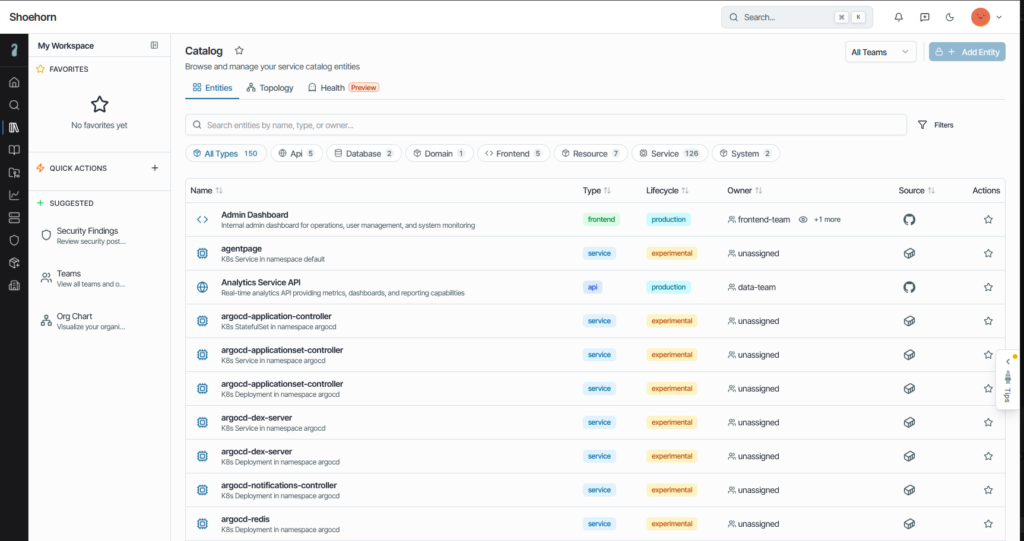
One view of your whole stack: every workload across every cluster, the cloud resources behind them, ownership, and scorecards. No flipping between cluster dashboards, cloud consoles, and team wikis to answer one question.
The sovereignty story is downstream of that. Because Shoehorn is genuinely self-hostable in one Terraform apply, you can run it on infrastructure you control, in a jurisdiction you choose. That’s why it’s a natural fit for UpCloud customers. But sovereignty isn’t the pitch. Simplicity is. Sovereignty is what you get for free when the product is small enough that one person can run it.
The rest of this post is what that looks like in practice.
Shoehorn is an Intelligent Developer Platform: service catalog, scaffolding engine, scorecards, fuzzy search, multi-tenant by design. Same category as Backstage, Port, Cortex.
The differentiator is operational. We built it for the 95% of teams that don’t have a dedicated platform team to maintain a portal. Opinionated defaults instead of a plugin ecosystem. Auto-discovery from Kubernetes, GitHub, and your IdP instead of hand-written manifests. One install, sensible defaults, working catalog inside an afternoon. One person can run it. That’s the whole product thesis.
Architecturally, it’s a small set of Go microservices (api, eventbus, worker, crawler, forge) backed by Postgres 18, Meilisearch, Valkey, and Redpanda. Authentication is OIDC: Zitadel, Okta, or any compliant provider. Multi-tenant isolation is enforced at the database layer using Postgres row-level security, not application-layer filtering, so a forgotten WHERE clause can’t leak data across tenants.
It ships as a Helm chart, and that’s enough if you want to drive it yourself. But for partners and customers who’d rather not assemble the pieces by hand, we ship something more direct.
Platform engineers ask us this regularly: What does Shoehorn add over kubectl and ArgoCD?
Shoehorn doesn’t replace either of them. It sits at a different layer.
kubectl answers “what’s the state of this resource, in this cluster, right now?” It’s a per-cluster CRUD tool. Brilliant for operations. Useless for “which team owns the payment service?” or “which services are below tier-2 reliability?”, because those questions aren’t about resources, they’re about your organisation.In day-to-day terms, here’s how the three pieces work together for a typical Shoehorn-on-Kubernetes setup:
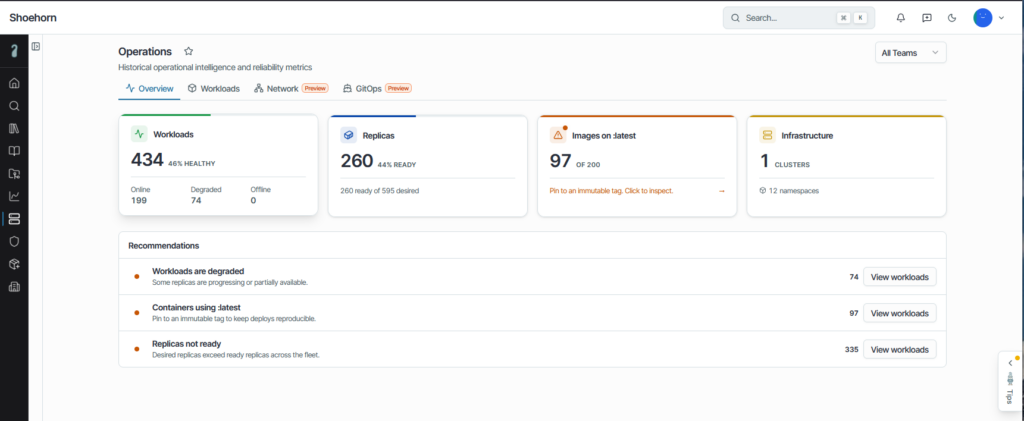
A small (~50m CPU, <150 MB memory) push-based agent runs in each of your clusters. It watches the Kubernetes API, samples metrics-server for CPU/memory aggregates, and watches GitOps CRDs (ArgoCD Applications, Flux Kustomizations and HelmReleases). Every 30 seconds it pushes a batched, read-only summary to the Shoehorn API.
What this gives you, with literally zero config beyond installing the agent:
team: payments-team), so there’s no separate manifest to maintain.For richer metadata than labels can carry, add a single annotation pointing at an entity file:
annotations:
  # Relative path, resolved against the repo URL Shoehorn already knows from ArgoCD/Flux/crawler
  shoehorn.dev/entityFile: ".shoehorn/catalog.yaml"

  # Full URL, when the file lives in a different repo
  shoehorn.dev/entityFile: "https://github.com/acme/shared-configs/blob/main/.shoehorn/checkout.yaml"

  # Multi-service file with a fragment selector
  shoehorn.dev/entityFile: ".shoehorn/platform.yaml#checkout-api"
The file gives you full enrichment: relations, links, runbooks, and interfaces. Start with zero-config and add an entity file only when the extra detail is worth it.
shoehorn is a single Go binary, available via Homebrew, Scoop, mise, or a direct download. It does what gh does for GitHub: gives the developers who live in their terminal the same product the UI offers, without context-switching.
A flavour of what you can do without leaving your shell:
# Browse the catalog
shoehorn get entities --owner payments-team
shoehorn search "payment"
shoehorn get entity payment-service --scorecard

# Run a Forge workflow (scaffolding) from the terminal
shoehorn forge molds
shoehorn forge run new-go-service --inputs name=billing-api,team=payments-team

# Declarative ops: apply/diff/delete catalog entities like kubectl
shoehorn apply -f service.yaml
shoehorn diff -f service.yaml
shoehorn validate mold ./my-mold
The CLI is the same API surface the UI uses, so anything you can do interactively, you can script. CI/CD pipelines and developer onboarding scripts use it the same way they use kubectl.
Terraform isn’t just for the initial install. The Shoehorn Terraform provider (separate repo: terraform-provider-shoehorn) lets you declare catalog entities, teams, ownership, scorecards, and Forge molds the same way you declare any other infrastructure. So your developer platform, the thing that describes your organisation, can be version-controlled, peer-reviewed, and rolled back like any other Terraform state.
Combined with the install module, a partner or platform engineer can describe an entire Shoehorn deployment as code: the platform itself, the org structure, the scorecards, the discovery agent. One terraform apply from a fresh kubeconfig to a running, populated, scored, and owned developer platform.
kubectl is the tool for resources. ArgoCD is the tool for sync. Shoehorn is the tool for the things that span clusters, repos, and teams. The three sit at different layers and work fine together.
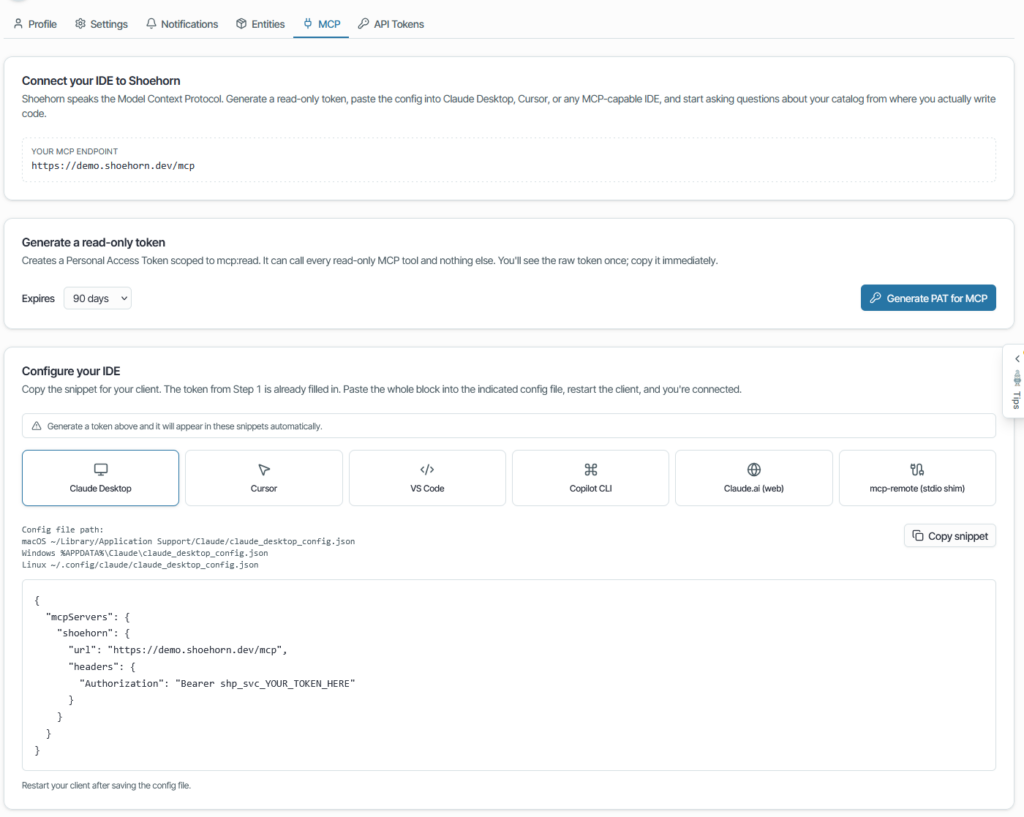
Shoehorn includes a built-in Model Context Protocol server. Every instance exposes an MCP endpoint at /mcp, with a public capability document at /.well-known/mcp for registries and IDE agents to auto-discover.
Three things matter about this for self-hosted teams:
readOnlyHint: true for every tool. Agents can search the catalog, fetch entity details, look up teams, query scorecards, and read docs. They cannot create, modify, or delete anything. We’ll add write tools deliberately, behind explicit scopes, when it’s clear they’re worth the surface area.mcp:read from /profile/mcp, with chosen expiry (30/90/365 days or never). The token is bcrypt-hashed at rest; the raw value is shown once. PATs scope to a tenant, so an agent acting on behalf of one tenant’s developer can never see another tenant’s data.The tool surface today covers catalog entities, teams, scorecards, repositories, workloads, security findings, dependencies, docs, and a few diagnostic tools (zombies, whoami). Enough to make an IDE agent genuinely useful for navigating an internal developer platform; not enough to let it create entities, run Forge molds, or change ownership.
The transport is stateless Streamable HTTP, protocol revision 2025-11-25. The agent on the other side is whichever one you already use. Create PAT token from /profile/
terraform applyOur Terraform modules at terraform-shoehorn-modules turn the entire deployment into a single terraform apply against any Kubernetes cluster you have a kubeconfig for.
module "shoehorn" {
  source = "../../modules/kubernetes"

  domain            = var.domain
  organization_name = var.organization_name
  organization_slug = var.organization_slug
  admin_email       = var.admin_email

  # Auth
  auth_provider = "okta"
  auth_config = {
    domain              = var.okta_domain
    clientId            = var.okta_client_id
    issuer              = var.okta_issuer
    authorizationServer = "default"
  }

  # Credentials
  credentials = {
    postgres_password      = random_password.postgres_password.result
    db_password            = random_password.db_password.result
    jwt_secret             = random_password.jwt_secret.result
    auth_encryption_key    = random_bytes.auth_encryption_key.base64
    session_encryption_key = random_bytes.session_encryption_key.base64
    valkey_password        = random_password.valkey_password.result
    meilisearch_master_key = random_password.meilisearch_master_key.result
    okta_client_secret     = var.okta_client_secret
    okta_api_token         = var.okta_api_token
  }

  # Bootstrap + Agent
  enable_bootstrap = var.shoehorn_api_key == ""
  deploy_agent     = true
  cluster_id       = var.cluster_id
  cluster_name     = var.cluster_name

  # Okta user/group sync. The module wires `auth.okta.clientSecretRef.key` and
  # `auth.okta.apiTokenSecretRef.key` automatically from the matching keys in
  # the `credentials` map above — no helm_set entry needed for those.
  helm_set = {
    "auth.orgdata.enabled"          = "true"
    "auth.orgdata.providers[0]"     = "okta"
    "auth.orgdata.primaryProvider"  = "okta"
  }

  health_check_protocol = "https"
}
That single block does the following, in order, with no manual steps in between:
random_password and random_bytes providers. Nothing is checked into source control, and no human types a password.The output is a working Shoehorn instance reachable at the domain you configured, with the catalog already showing whatever’s running in your cluster.
For a cloud partner, this means a customer can request “give me a developer platform”, and the answer is one Terraform apply against a freshly provisioned managed Kubernetes cluster. There’s no bespoke handoff between provisioning the infrastructure and provisioning the platform. From “I want this” to “it’s running” is the same workflow you already use for everything else in your stack.
The deployment-mechanics part is interesting because it’s uninteresting. There’s no clever deployment story to tell. You have a Kubernetes cluster (anywhere, on any provider, in any country) and Shoehorn deploys onto it. The cluster, the database storage, the object storage for backups, the OIDC provider: all of that lives wherever you put your cluster. The platform doesn’t depend on a SaaS control plane and doesn’t ship telemetry. The one outbound call in normal operation is a periodic license check, which we cover below.
This matters for sovereignty because sovereignty is mostly a property of where the data sits and who can compel access to it, not a property of the software itself. A self-hosted platform on infrastructure under your jurisdiction is sovereign. A hosted platform “with a European region” generally isn’t, because the company hosting it is subject to whatever legal regime applies to the parent.
By making Shoehorn fully self-hostable, with a deployment that takes one apply, we’re trying to remove the operational excuse that pushes teams towards the hosted option even when sovereignty matters to them. “We’d love to self-host, but we don’t have the bandwidth” is a real constraint. One terraform apply is a reasonable answer to it.
A few things we left out, on purpose:
One thing we do keep, which is worth being explicit about:
A short take on where we’re going. No dates, because we’d rather ship and announce than promise and slip. The order is up for negotiation; we plan the roadmap with customers, not at them. If something below matters to you and isn’t there yet, that’s a conversation we want to have.
The bigger direction, and the one we care most about, is making the platform itself more intelligent, invisibly.
Not a chatbot bolted to a sidebar. We’re building intelligence into the platform itself, surfacing proactive insights in the workflows you already use. The MCP server is the first piece. More as it ships.
Every bit of this stays consistent with the sovereignty posture. Inference runs inside your infrastructure, against your data. Where a model is involved, the customer chooses where it runs and what gets sent. No mandatory cloud AI dependency. “Intelligent” and “self-hosted” don’t have to be a contradiction.
UpCloud customers will be able to deploy Shoehorn onto their managed Kubernetes clusters with a single click: the same terraform apply shown above, wrapped in the kind of one-step UX that makes “spin up a developer platform” indistinguishable from “spin up a database.” One workflow provisions the cluster, runs the module, generates secrets, configures ingress, registers the agent, and populates the catalog.
Open, self-hostable, and built so you don’t have to build the portal before you can use it.