Comparison Guide: Object Storage Vs. Block Storage
-
About
- Type
- Blog
- Category
- Comparisons
New - NVIDIA B200 & B300 Dedicated GPU Clusters | Explore GPU clusters
About
Posted on 12.3.2025
Cloud storage has become more efficient and flexible than traditional (on-premises) storage. It allows companies to store and retrieve data quickly, link storage to virtual machines, compute resources and CDNs, and access data from anywhere.
However, like traditional storage, different data types require different storage methods. Two of the most widely used are object storage and block storage.
Rather than asking which is better, think of them as footballers playing in different positions—each serves a unique purpose and isn’t meant to replace the other. This guide will explain how they work, their key differences, and when to use each.
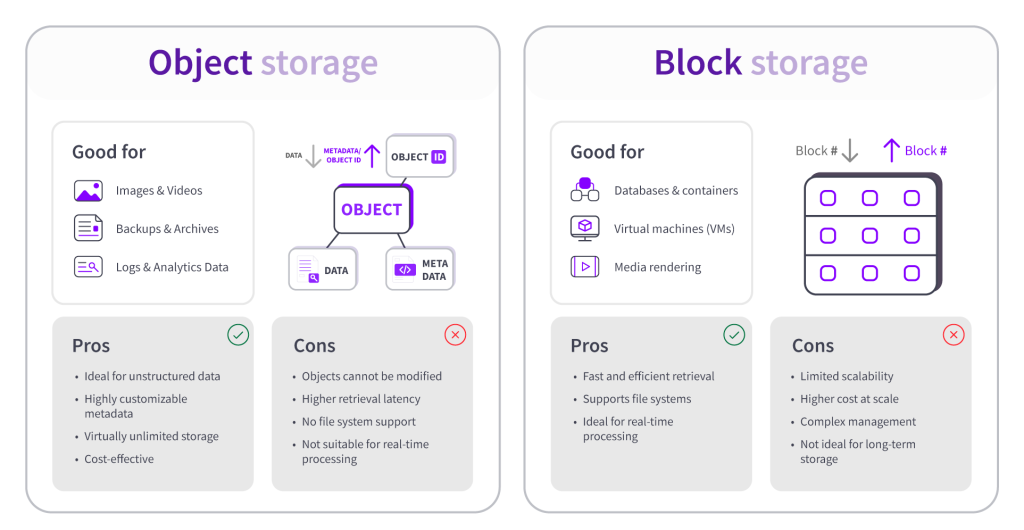
Object storage gets its name from the way it stores data—as objects instead of blocks or files. Unlike traditional hierarchical file systems that use folders and directories, object storage follows a flat structure where all objects exist at the same level within a shared storage space rather than being organized into a directory system.
Each object consists of three key components:
A key strength of object storage is its highly customizable metadata, which makes data retrieval efficient through metadata lookups and HTTP-based API calls. Additionally, its objects are spread across multiple storage servers within a cloud infrastructure, making object storage highly scalable and durable.
The combination of a flat file structure and distributed architecture allows object storage to handle massive amounts of unstructured data, making it an excellent choice for backups, media storage, and data archiving.
One key characteristic of object storage is immutability—once an object is stored, it cannot be modified, only retrieved or replaced. Making it well-suited for storing static data, such as:
While these characteristics and abilities give object storage advantages, they also highlight weaknesses.
It’s important to note that while object storage can also be used in on-premises environments, it primarily emerged with advancements in cloud computing—making it a key component of modern cloud architectures. UpCloud offers a scalable, secure, and S3-compatible managed object storage solution.
Block storage takes a different approach to data storage. Instead of storing data as a whole, it breaks it into smaller units called blocks and distributes them across different physical disks. Each block is assigned a unique address, making retrieval fast and efficient.
Block storage stores minimal metadata to reduce processing overhead. Instead of relying on extensive metadata lookups, it maintains a lookup table that tracks block locations, allowing faster retrieval than object storage.
Block storage is ideal for structured data and provides raw storage space that can be formatted with a file system. It allows frequent data modifications, making it suitable for:
As mentioned earlier, object and block storage serve different purposes. Like object storage, block storage has its strengths and weaknesses, depending on the use case.
The unique characteristics of each storage medium provide options for different use cases. Understanding these differences helps you choose the right storage solution for your needs. Let’s explore their similarities and differences side by side.
| Feature | Object Storage | Block Storage | Similarities |
| Data Structure | Presents data as objects with metadata, abstracting away underlying storage complexities. | Stores data in fixed-size blocks | Both store data persistently |
| Access Method | HTTP-based API calls (higher latency) | Direct disk access (low latency) | Both are used in cloud environments |
| Scalability | Highly scalable (virtually unlimited storage) | Limited (fixed volume size) | Both offer redundancy & durability |
| File System Support | No (flat storage model) | Yes (NTFS, EXT4, etc.) | Both are managed storage solutions in cloud platforms |
| Use Case | Backups, media storage, logs | Databases, VMs, transactional apps | Both can be used for application data storage |
| Performance | Slower (entire object must be rewritten) | Faster (supports frequent updates) | Both are designed for reliable data storage |
| Cost Efficiency | More cost-effective for large datasets | Higher cost at scale | Both can be optimized based on workload needs |
It’s not about which is better — it’s about when and how to use each. The right choice depends on your workload needs. Object storage is the way to go if scalability and unstructured data are your focus. On the other hand, block storage is the better fit if you need high performance and low latency.
UpCloud provide both options to suit different storage demands. Check out our Block Storage options – for fast, efficient, and reliable data system optimised for minimal latency (plus it’s the default for all Cloud Servers!). Or, if you are looking to host a large quantity of unstructured data, take a look at our Object Storage. It’s secure, scalable, and S3-compatible, so you can store, manage, and scale your data either from the UI or with a fully programmable API- and SDK- interface.