When Do You Need a Kubernetes Operator? A Practical Guide
-
About
- Type
- Blog
New - NVIDIA B200 & B300 Dedicated GPU Clusters | Explore GPU clusters
About
Posted on 2.6.2026
Kubernetes has become the de facto platform for container orchestration and for organizations building distributed applications. However, operational complexity remains one of its biggest challenges. Nearly 70% of Kubernetes users point to fragmented tooling, cluster management challenges, and difficulties running stateful workloads at scale. Kubernetes operators were introduced to address these challenges and simplify “Day 2” operations such as backups, version upgrades, and automated failure recovery.
Contrary to popular opinion, however, operators are not a silver bullet. They carry real engineering costs in implementation, testing, maintenance, and a significantly expanded blast radius when things go wrong.
In this article, we will explore what Kubernetes operators are, examine common use cases in the development workflow, provide a practical decision framework for when to use them, and walk through a practical example using Crossplane on UpCloud Kubernetes Service (UKS).
A Kubernetes operator is an application-specific controller that extends the Kubernetes API through custom resource definitions (CRDs) to automate the lifecycle management of complex applications on behalf of a Kubernetes user. It encapsulates domain-specific knowledge that enables them to account for the nuances of the applications they manage.
To truly understand what a Kubernetes Operator is, it helps to look at how we traditionally manage applications.
In a native Kubernetes setup without any third-party tools, the DevOps engineer or administrator is the brain of the operation. You write the YAML manifests, deploy the Pods, and manually handle the configuration.
If the application needs an update, a vulnerability patch, or a code deployment, you have to trigger it. If traffic spikes and you aren’t using automated autoscalers, you have to scale the application manually.
A Kubernetes Operator changes this entirely by packaging human operational knowledge into software. Instead of deploying and managing the application directly, you deploy an operator. It relies on a control loop that continuously compares the system’s actual state with the desired configuration and automatically reconciles them when a deviation occurs.
An operator consists of three primary components working together to achieve this automation:
PostgresDatabase. Now, you can write a simple YAML file like this:apiVersion: database.example.com/v1
kind: PostgresDatabase
metadata:
name: my-app-prod-database
spec:
version: '15'
replicas: 3
storage: 50GiWhen you apply the PostgresDatabase as shown in the YAML configuration above, the Custom Controller intercepts it. It shows that you want 3 Postgres 15 replicas with 50 Gi of storage. The controller then automatically provisions the underlying Kubernetes stateful sets, sets up replication, configures the storage volumes, and establishes network security.
PostgresDatabase). When you apply your specific configuration file (my-app-prod-database), that running, living instance is the custom resource. If you need to scale your database from 3 replicas to 5, you don’t manually create new pods. You simply update the replicas: 5 fields in your Custom Resource.Kubernetes Operators are often mistaken for just another Kubernetes resource, but in reality, they capture operational knowledge in code and are well-suited for several scenarios, like:
1) Stateful Applications and Databases:
Managing stateful systems and databases is one of the primary reasons teams reach for an operator. Databases such as PostgreSQL, MySQL, Cassandra, and MongoDB, as well as distributed systems like Kafka, have operational requirements that Kubernetes does not natively support. These systems require tasks such as replication management, failover handling, backup scheduling, and version upgrades.
An operator embeds this operational expertise directly into Kubernetes. Instead of manually executing runbooks, teams can define the desired state and let the operator automatically handle the complexity. If a PostgreSQL primary node fails in an application, the Kubernetes Operator can automatically promote a replica, update connections, and restore service without requiring manual intervention.
b) Infrastructure provisioning
Another use case of the Kubernetes Operator is treating cloud infrastructure as native Kubernetes resources. Operators unify this entire workflow by treating cloud infrastructure such as AWS S3 buckets, GCP Cloud SQL instances, VPCs, and DNS records directly as Kubernetes objects. By deploying infrastructure operators like Crossplane, developers can manage their entire stack through a single control plane using unified Kubernetes manifests.
So if a developer creates a custom resource that requests a managed database, the operator will automatically provision it on AWS, Azure, or UpCloud and expose the connection details to the application.
While this creates a powerful self-service experience for developers, it also adds another layer of operational complexity. If the cluster hosting the operator becomes unavailable or misconfigured, infrastructure provisioning workflows may also be affected. Teams should weigh these operational costs against the convenience of a unified control plane.
c) Platform engineering / internal developer platforms
Operators are particularly valuable when building a platform or an internal service for other teams. They allow platform teams to provide simplified, declarative internal APIs.
A developer only needs to submit a minimalist custom manifest, such as a WebApp or MicroserviceDeployment CRD, specifying only their container image and resource tier. Behind the scenes, the Kubernetes Operator intercepts this simple request and automatically implements the desired state of the infrastructure. It generates the deployment, configures the HPA, provisions the cert-manager TLS certificate, and encodes all platform policies, so developers don’t have to deal with Ingress, PodDisruptionBudgets, or NetworkPolicies.
d) Automated Backup, Recovery, and Disaster Recovery
Business-critical applications require reliable backup and recovery mechanisms. Instead of maintaining separate backup scripts and cron jobs, organizations can define backup policies directly in Kubernetes. So the Kubernetes Operator can then continuously manage these workflows. In the event of a disaster, it can also restore data declaratively from backups using custom resources.
For instance, a database operator can automatically create backups every six hours, store them in UpCloud’s managed object storage, and recover to a specific point in time after an outage with minimal data loss.
Kubernetes operators may provide additional functionality to Kubernetes when managing certain applications; however, not every problem in Kubernetes needs an operator. Hence, when building an Operator, you need to acknowledge the high, ongoing engineering and operational costs that come with building Kubernetes Operator patterns, like:
When you decide to build a Kubernetes operator for your application, there’s one question worth asking: Does your situation require stateful, ongoing reconciliation logic that Kubernetes doesn’t handle natively?
If the answer is yes, then a Kubernetes operator might be justified. If not, you might just be introducing added complexity to your workflow.
As discussed earlier, not all cases or applications require Kubernetes Operators. If you are just trying to template Kubernetes manifests, Helm or Kustomize is your option. Most teams start down the operator path because they want parameterized manifests with some conditional logic. Helm is explicitly designed for this. It’s well-understood and does not introduce runtime complexity into your cluster.
If you are orchestrating a one-off or sequential workflow (like database migrations or initialization steps), use CI/CD pipelines, jobs, or init containers instead of a full reconciliation loop.
So far, we have discussed Kubernetes Operators from a conceptual perspective: how they extend Kubernetes, encode operational knowledge, and automate complex workflows. Now let’s look at a practical example of how this works.
In this section, we will use Crossplane running on UpCloud Kubernetes Service (UKS) to demonstrate how Operators can bridge the gap between your Kubernetes cluster and external cloud platforms.
Rather than building a traditional application-focused Operator from scratch, we will use Crossplane because it demonstrates a core Operator pattern used heavily in production today.
Before we begin, make sure you have a few basics ready:
Now that you have confirmed your cluster is ready, we need to inject the Crossplane Operator into your UKS cluster so it can start its background control loop.
kubectl create namespace crossplane-systemhelm repo add crossplane-stable https://charts.crossplane.io/stable helm repo updatehelm install crossplane \--namespace crossplane-system crossplane-stable/crossplane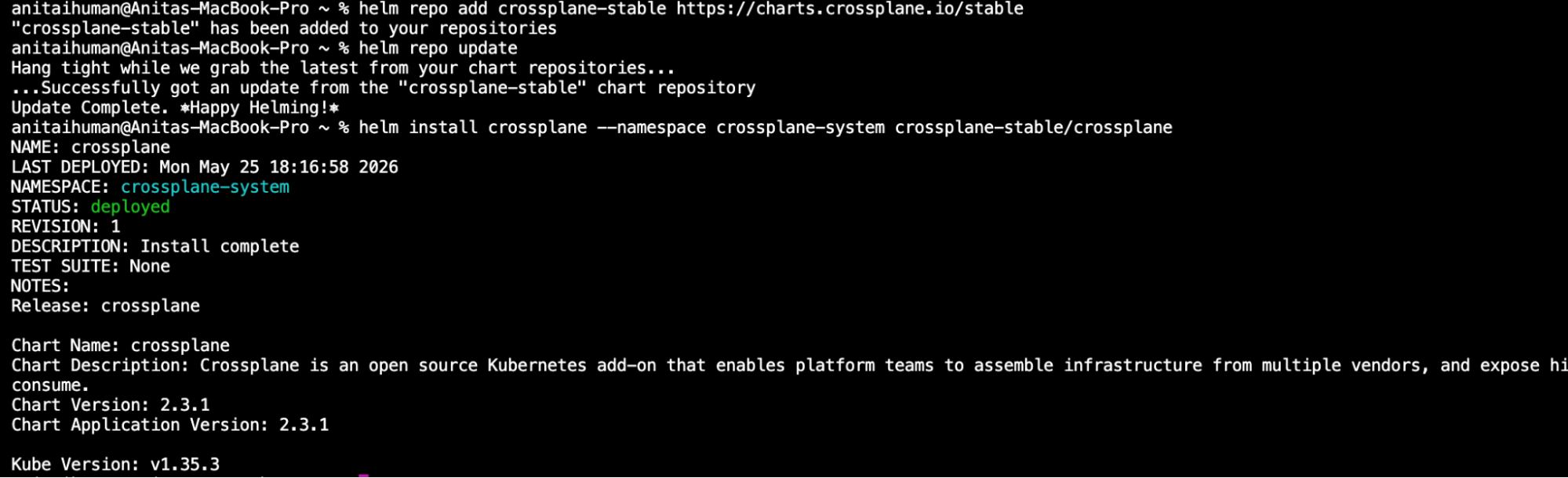
Once you have confirmed that the crossplane status is deployed, the next step is to confirm that the operator has successfully moved in and started its background loops.
Let’s ask your cluster to list its running applications with the command:
kubectl get pods \-n crossplane-system
You should see Crossplane pods running successfully. This tells us that the cluster has gained new infrastructure management capabilities.
At this point, the Crossplane operator is running in your cluster; however, Crossplane uses providers that contain the cloud-specific logic required to communicate with external platforms such as AWS, Azure, GCP, or, in this case, UpCloud.
So we need to install the UpCloud provider.
This process registers Custom Resource Definitions (CRDs) into your cluster, effectively teaching Kubernetes the vocabulary of UpCloud infrastructure.
provider-upcloud.yaml with the following contentkubectl apply \-f provider-config.yamlBehind the scenes, the main Crossplane operator reads this file and contacts the UpCloud repository to download the UpCloud package. Now the Operator pattern becomes visible in practice. The Provider acts as a specialized controller that monitors Kubernetes resources and translates them into cloud infrastructure operations.
Note: The package version must be present in the Upbound registry. As of writing, v0.1.1 is the latest/stable release. Do not guess version numbers; always verify at marketplace.upbound.io.
Even though the operator is active, Crossplane still needs credentials to provision resources in your UpCloud account. So we need credentials for our Upcloud API Subaccounts.
upcloud-credentials.json. Replace the placeholder text with your actual UpCloud API details in:{
"username": "YOUR\_UPCLOUD\_API\_SUBACCOUNT\_USERNAME",
"password": "YOUR\_UPCLOUD\_API\_SUBACCOUNT\_PASSWORD"
}kubectl create secret generic upcloud-creds \-n crossplane-system \--from-file=creds=./upcloud-credentials.jsonkubectl get secret upcloud-credentials \-n crossplane-systemNote: Now that the credentials are securely encrypted in the clutter, you can safely delete the local text file from your desktop.
ProviderConfig that tells our UpCloud operator exactly which secret vault to use when it needs to authenticate with the cloud.provider-config.yamlapiVersion: provider.upcloud.com/v1beta1
kind: ProviderConfig
metadata:
name: default
spec:
credentials:
source: Secret
secretRef:
namespace: crossplane-system
name: upcloud-credentials
key: credentialskubectl apply \-f provider-config.yamlAt this point, Crossplane has everything required to provision real infrastructure on UpCloud.
Now we are ready to see the operator pattern complete its loop.
Instead of opening the UpCloud dashboard and manually creating resources, we will define infrastructure using Kubernetes manifests.
Let’s provision a simple, isolated network router using nothing but a standard Kubernetes configuration file:
upcloud-network.yaml:apiVersion: network.upcloud.com/v1alpha1
kind: Network
metadata:
name: uks-operator-demo-network
spec:
forProvider:
name: uks-demo-network
zone: de-fra1
ipNetwork:
- address: 10.0.1.0/24
dhcp: true
family: IPv4
providerConfigRef:
name: defaultkubectl apply \-f upcloud-network.yamlkubectl get networks.network.upcloud.com \-w
The EXTERNAL-NAME field is the actual UpCloud network UUID, confirming that the Operator has successfully made an API call to UpCloud and that the network now exists in your cloud account.
What is happening here is the following:
You applied a YAML manifest
↓
Crossplane’s controller (Operator) detected the new Network resource
↓
It’s called the UpCloud API: POST /1.3/network
↓
UpCloud created the network and returned the UUID (03a9a60d…)
↓
The Operator wrote that UUID back to EXTERNAL-NAME
↓
Status updated: SYNCED: True, READY: True
This is the reconciliation loop, where the operator continuously monitors the desired state (your YAML) and ensures the actual state (UpCloud infrastructure) matches it. If someone deletes the network directly in UpCloud, Crossplane will recreate it. If you delete the Kubernetes resource, Crossplane will delete it from UpCloud.
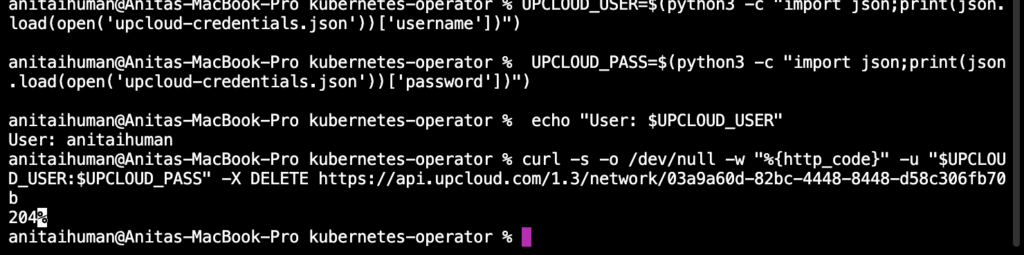
To understand why operators are highly valued compared to native Kubernetes deployment scripts, let’s test the self-healing capabilities of this operator.
KUBECONFIG=/Users/anitaihuman/Downloads/dev-md-de-fra1\_kubeconfig.yamlkubectl get networks.network.upcloud.com \-wUPCLOUD\_USER=$(python3 \-c "import json;print(json.load(open('upcloud-credentials.json'))\['username'\])") UPCLOUD\_PASS=$(python3 \-c "import json; print(json.load(open('upcloud-credentials.json'))\['password'\])")curl \-s \-o /dev/null \-w "%{http\_code}" \-u "$UPCLOUD\_USER:$UPCLOUD\_PASS" \-X DELETE https://api.upcloud.com/1.3/network/03a9a60d-82bc-4448-8448-d58c306fb70bYou should receive a 204 response immediately, confirming the network has been removed from UpCloud.
kubectl get networks.network.upcloud.com uks-operator-demo-network
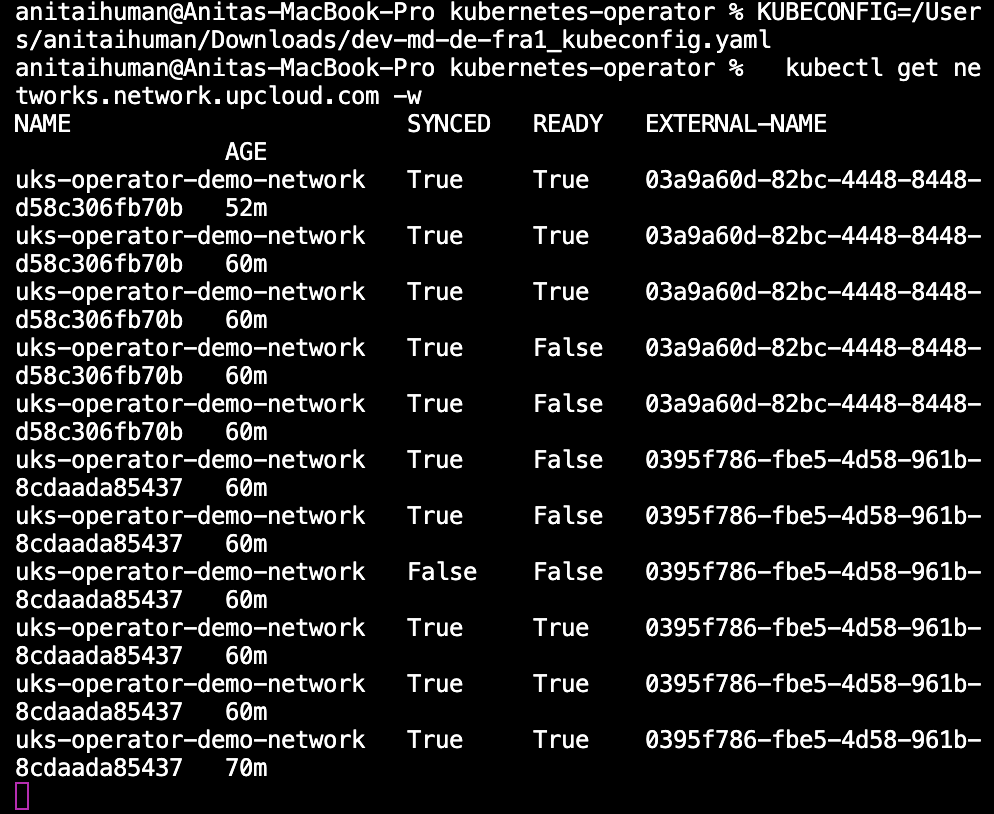
The Crossplane detected a drift and is automatically rebuilding the network in UpCloud without any manual intervention.
You will notice that the EXTERNAL-NAME field will also contain a new UpCloud network UUID, proving that the operator actually made a real API call to UpCloud and rebuilt the infrastructure from your Kubernetes manifest alone. If we did not have the Kubernetes Operator, that resource would be lost completely until a developer notices and manually fixes it.
Kubernetes Operators have fundamentally changed how we think about automation by shifting the operational burden from developers to software. They enhance the Kubernetes API by embedding domain expertise into specialized controllers and integrating with Kubernetes resources such as jobs, stateful sets, and RBAC operators. Evidently, Operators make application management simpler by automating the application lifecycle for engineering teams. However, the decision to use an operator boils down to a fundamental trade-off between operational strength and development complexity.
If you are ready to explore the capabilities of Kubernetes Operators without the added complexity of managing control plane infrastructure, a managed platform provides the perfect sandbox. With a service like UpCloud Kubernetes Service (UKS), you can quickly spin up a production-ready cluster and start experimenting with Operators such as Crossplane, CloudNativePG, and other cloud-native automation tools.