New modern operating systems with improved security out of the box
-
About
- Type
- Blog
- Categories
- AnnouncementsProduct Updates
About
Posted on 15 November 2022
Password strength has always been a concern for all internet-connected systems. Doubly so for any cloud servers with open service ports. If you’ve ever had a look at your Syslogs after deployment, many servers are immediately subjected to brute-force attacks straight from creation.
For the longest time, the best advice has been to disable password login and use SSH keys for authentication instead. Last year, we introduced one-time passwords for better security while highly recommending everyone move to the SSH-keys-only approach. Now with further changes coming with new operating system templates, it’s time to say goodbye to passwords!
Starting with the releases of the latest templates from Ubuntu, Alma and Rocky Linux, all new Cloud Server deployments are done with SSH keys only. Enabling password login at server creation is not available using these operating system templates. The following operating systems and any future versions can only be created with SSH keys:
When deploying one of these templates via your UpCloud Control Panel, you will notice only the SSH keys option is available. Consequently, the Metadata service needs to be enabled during deployment for adding the SSH keys to the server.
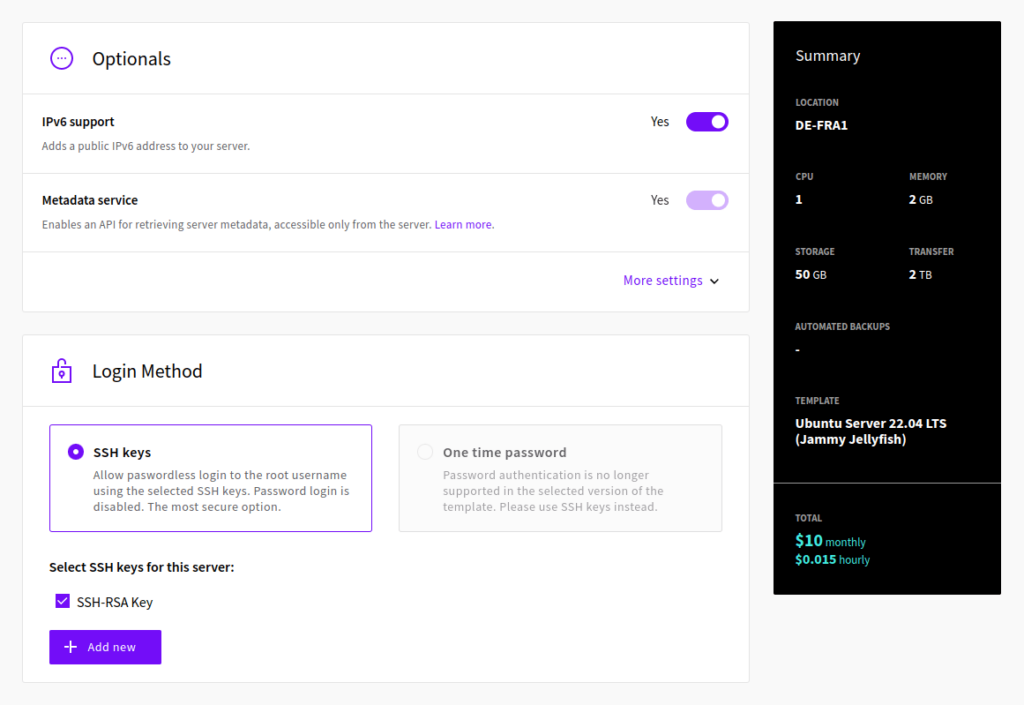
Similarly, if you are deploying a new Cloud Server using one of these templates via the UpCloud API, you will need to enable Metadata. The Metadata service can be disabled after server creation if not needed.
One-time passwords remain an option for older templates while available. If your service relies on password authentication, choose one of the other operating systems instead.