Use this tutorial if you’re ready to build. You’ll provision an UpCloud VM with the OpenTofu UpCloud provider, configure remote state on an S3-compatible bucket (with DynamoDB locking), enable client-side AES-GCM encryption for state and plans (OpenTofu ≥1.7), add guardrails with Conftest + OPA, and optionally verify Terraform compatibility via import. If you want the concepts, trade-offs, and state patterns first, read OpenTofu 101 guide. Otherwise, continue to Prerequisites.
Prerequisites
Make sure you have the following set up before proceeding.
1. Install OpenTofu (v 1.7 or later)
You’ll need OpenTofu 1.7 or newer for client-side encryption support.
Install via OpenTofu installation docs if you don’t have it already.
Verify your installation:
tofu version2. Install Terraform
You will use Terraform later to check backward compatibility.
Install via Terraform installation docs if you don’t have it already.
Verify your installation
terraform version3. Set up your UpCloud account and Object Storage
You’ll need:
- An active UpCloud account.
- An Object Storage instance (for remote state).
- Access the official guide to create the object storage instance.
- Within the instance:
- Create a bucket for the state.
- Create a user scoped to Object Storage.
- Grant the user an S3 full access policy.
- Generate an AWS access key and secret for that user.
- A subaccount with API access (username and password). This lets OpenToFu authenticate into UpCloud.
Once these are ready, you can begin building and deploying your infrastructure with OpenTofu.
STEP 1: Create the project structure and populate it with code
Before you start running commands, set up a working directory for your OpenTofu project (Use this sample repository as reference). This directory will hold your configuration files, policy rules, and environment variables.
Create the project folder and run the following commands in your terminal:
mkdir -p opentofu-upcloud-starter/policy
cd opentofu-upcloud-starter
touch main.tf variables.tf outputs.tf backend.tf .env
touch policy/max-vm-size.rego policy/required-labels.rego policy/zone-restriction.rego
After creating the files, your structure should look like this:
opentofu-upcloud-starter/
├─ .env
├─ main.tf
├─ variables.tf
├─ outputs.tf
├─ backend.tf
└─ policy/
   ├─ max-vm-size.rego
   ├─ required-labels.rego
   └─ zone-restriction.rego
# .gitignore
.env
.tofu/
.terraform/
*.tfstate
*.tfstate.*
terraform.tfstate.backup
crash.log
override.tf
override.tf.json
*.tfvars
*.tfvars.json
tfplan
plan.jsonPopulate the files with code
.envHolds the credentials you need to run OpenTofu on UpCloud properly
export UPCLOUD_USERNAME="<upcloud_api_username>"
export UPCLOUD_PASSWORD="<upcloud_api_password>"

# OpenTofu client-side encryption
export TF_VAR_encryption_passphrase="<create a strong-passphrase>"

# UpCloud Object Storage S3-compatible credentials (not AWS)
export AWS_ACCESS_KEY_ID="<object-storage-access-key>"
export AWS_SECRET_ACCESS_KEY="<object-storage-secret-key>"main.tfDeclares the UpCloud provider and creates a minimal VM with cloud-init and public networking.
terraform {
 required_version = ">= 1.7.0" # OpenTofu 1.7+ for encryption
 required_providers {
   upcloud = {
     source  = "upcloudltd/upcloud"
     version = "~> 5.0"
   }
 }

}

provider "upcloud" {
 # Uses UPCLOUD_USERNAME and UPCLOUD_PASSWORD from environment
}

resource "upcloud_server" "my_server" {
 hostname = var.hostname
 zone     = var.zone
 plan     = var.vm_type

 template {
   storage = "Ubuntu Server 22.04 LTS (Jammy Jellyfish)"
  size    = var.storage_size
 }

 # Required by your policy pack
 labels = var.labels

 network_interface {
   type = "public"
 }

 # Required for cloud-init images
 metadata  = true
 user_data = <<-EOT
   #cloud-config
   runcmd:
     - [ bash, -lc, "echo upcloud ok" ]
 EOT

}
variables.tf Inputs with sensible defaults and validation aligned with policy rules.
variable "hostname" {
 description = "Server hostname"
 type        = string
 default     = "my-server"
}

variable "zone" {
 description = "UpCloud zone"
 type        = string
 default     = "us-nyc1"
}

variable "vm_type" {
 description = "VM plan/size"
 type        = string
 default     = "2xCPU-4GB"
}

variable "storage_size" {
 description = "Storage size in GB"
 type        = number
 default     = 50
}

# Required by your Rego policies
variable "labels" {
 description = "Key/value labels applied to the server"
 type        = map(string)
 default = {
   environment = "dev"
   managed_by  = "opentofu"
 }
 validation {
   condition     = contains(keys(var.labels), "environment") && contains(keys(var.labels), "managed_by")
   error_message = "labels must include keys 'environment' and 'managed_by'."
 }
}

#Encryption
variable "encryption_passphrase" {
 description = "Passphrase for state encryption"
 type        = string
 sensitive   = true
}outputs.tfExposes the server’s public IPv4 address after apply.
output "server_ipv4" {
 description = "IPv4 address of the server"
 value       = upcloud_server.my_server.network_interface[0].ip_address
}backend.tfConfigures encrypted remote state on UpCloud Object Storage and OpenTofu client-side encryption.
terraform {
  # Remote state on UpCloud Object Storage (S3-compatible)
  backend "s3" {
    bucket                      = "Your_bucket_name" # change to your bucket
    key                         = "${terraform.workspace}/terraform.tfstate"
    endpoint                    = "Your_bucket_endpoint" # change to your endpoint
    region                      = "Your_region"                          # required by S3 API, any string
    skip_credentials_validation = true
    skip_metadata_api_check     = true
    skip_region_validation      = true
   force_path_style = true      = true
    # Uses AWS_ACCESS_KEY_ID and AWS_SECRET_ACCESS_KEY from env
  }

  # Client-side encryption for state and plan (OpenTofu 1.7+)
  encryption {
    key_provider "pbkdf2" "main" {
      passphrase = var.encryption_passphrase
    }

    method "aes_gcm" "default" {
      keys = key_provider.pbkdf2.main
    }

    state { method = method.aes_gcm.default }
    plan { method = method.aes_gcm.default }
  }

}policy/max-vm-size.regoFails plans creating servers larger than an allowed size set.
# Check VM not too big
# policy/max-vm-size.rego
package main

allowed_plans := {"1xCPU-1GB","1xCPU-2GB","2xCPU-4GB","4xCPU-8GB"}

deny[msg] {
  r := input.resource_changes[_]
  r.type == "upcloud_server"
  r.change.actions[_] == "create"
  plan := r.change.after.plan
  not allowed_plans[plan]
  msg := sprintf("VM plan '%s' exceeds maximum allowed size of 4xCPU-8GB", [plan])
}
policy/required-labels.regoEnforces the presence of required labels for governance and tracking.
 # Check labels exist
package main
import future.keywords.if
import future.keywords.contains

# Use a list (or bind from the set with [_])
required_labels := ["environment", "managed_by"]

deny contains msg if {
  some i
  r := input.resource_changes[i]
  r.type == "upcloud_server"
  r.change.actions[_] == "create"

  labels := r.change.after.labels

  req := required_labels[_]

  not labels[req]

  msg := sprintf("Server is missing required label: %s", [req])
}policy/zone-restriction.regoRestricts deployment to approved zones only.
# Check zone is allowed
package main
import future.keywords.if
import future.keywords.in
import future.keywords.contains

allowed_zones := {
  "us-nyc1",
  "us-chi1",
  "us-sjo1",
  "de-fra1",
}

deny contains msg if {
  some i
  r := input.resource_changes[i]
  r.type == "upcloud_server"
  r.change.actions[_] == "create"

  zone := r.change.after.zone
  not (zone in allowed_zones)

  msg := sprintf("Server is in unauthorized zone: %s", [zone])
}
Step 2: Initialize, validate policies, and deploy
With your files in place, it’s time to initialize OpenTofu, authenticate using your .env credentials, validate the configuration against policy rules, and finally apply the changes.
Load your environment variables
Before doing anything, export your credentials and encryption passphrase by sourcing the .env file you created earlier.
source .envInitialize OpenTofu
Initialize the working directory, download the UpCloud provider, and configure the remote backend.
tofu init -upgrade -reconfigureYou should see confirmation that the backend was successfully initialized and the UpCloud provider plugin was installed.
Create a plan and export it to JSON
Generate a plan file and convert it to JSON for policy checks.
tofu plan -out=tfplan
tofu show -json tfplan > plan.json
This produces:
- tfplan — a binary plan used by OpenTofu during apply.
- plan.json — a readable JSON version used by Conftest.
Run policy validation
Use Conftest to evaluate your plan against the Rego rules in the policy/ directory.
conftest test plan.json -p policy/If any policy fails, Conftest will print failure messages explaining what to fix (e.g., missing labels or an unauthorized zone). Once all checks pass, you’re ready to deploy.

Apply the configuration
Apply the plan to create your UpCloud VM.
tofu apply -auto-approve tfplanWhen the process completes, OpenTofu will output the server’s public IPv4 address.
Verify deployment
List the resource and extract its unique server ID for later migration testing.
tofu state show upcloud_server.my_server | grep -i idMultiple IDs could show; pick the first one, and also cross-check with the server ID created via your UpCloud user interface. Note it down somewhere. You’ll use it later.

You now have a running UpCloud instance managed by OpenTofu, verified by policy checks, and stored in encrypted remote state.
Optional: GitHub Actions
Add one line above it: “Gate apply on main; PRs run plan only.
# .github/workflows/opentofu.yml
name: OpenTofu CI
on:
  pull_request: { paths: ["**.tf"] }
  push: { branches: ["main"] }
jobs:
  plan:
    runs-on: ubuntu-latest
    steps:
      - uses: actions/checkout@v4
      - uses: opentofu/setup-opentofu@v1
      - run: tofu init -input=false
      - run: tofu plan -input=false -no-color | tee plan.txt
  apply:
    if: github.ref == 'refs/heads/main' && github.event_name == 'push'
    runs-on: ubuntu-latest
    steps:
      - uses: actions/checkout@v4
      - uses: opentofu/setup-opentofu@v1
      - run: tofu init -input=false
      - env: { TOFU_CONFIRM: "true" }
        run: tofu apply -input=false -auto-approve
Step 3: Verify encryption at rest
OpenTofu 1.7+ supports client-side state encryption, which means your state file is encrypted before it’s uploaded to UpCloud Object Storage.
In this step, you’ll confirm that the stored file is unreadable and only OpenTofu can decrypt it locally.
Locate your remote state path
The backend configuration in backend.tf stores state under:
s3://<your-bucket>/<workspace>/terraform.tfstateBy default, the workspace is default. Updated with your appropriate bucket name.
Download and inspect the encrypted file
Run the following command to copy the state file from UpCloud Object Storage and display its first few encrypted bytes:
aws s3 cp s3://<your-bucket>/<workspace>/terraform.tfstate /tmp/state.enc --endpoint-url <your-bucket-endpoint> && xxd /tmp/state.enc | head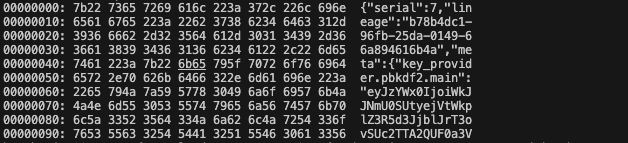
You should see binary-looking data, which confirms that the file is encrypted before upload.
Decrypt locally using OpenTofu
Now confirm that OpenTofu can read and decrypt the file with your passphrase:
tofu show -json /tmp/state.enc | headIf decryption succeeds, you’ll see JSON output containing your resource definitions (e.g., upcloud_server.my_server).
Clean up temporary file
rm /tmp/state.encAt this point, you’ve verified that the state file stored in Object Storage is encrypted at rest and only OpenTofu with the correct passphrase can decrypt and read it.
Step 4: Migration test to verify Terraform compatibility
Create a throwaway copy
Keep the real project untouched while you test. Switch to another terminal and make sure you are still in your project root directory opentofu-upcloud-starter.
# from your repo root
mkdir -p /tmp/tf-migrate && cp -R . /tmp/tf-migrate
cd /tmp/tf-migrate
This copies all files from your original project into a temp workspace.
Switch this copy to a local backend
Terraform cannot read OpenTofu’s encryption block or encrypted remote state. We will migrate the encrypted remote state to a plain local file.
Edit backend.tf in /tmp/tf-migrate to only contain:
terraform {
  backend "local" {
    path = "terraform.tfstate"
  }
}
Warning: Do not point Terraform at the encrypted remote state created by OpenTofu. Terraform cannot read OpenTofu’s client-side–encrypted state. Migrate to a local state (as shown) or to an unencrypted backend first.
Update the resource with lifecycle ignore rules
In the /tmp/tf-migrate copy, edit main.tf and replace the upcloud_server block with this version.
These ignore_changes entries prevent false drift during import by ignoring write-only or provider-normalized fields.
resource "upcloud_server" "my_server" {
  hostname = var.hostname
  zone     = var.zone
  plan     = var.vm_type

  # Keep template so the schema is satisfied (creation-time detail)
  template {
    storage = "Ubuntu Server 22.04 LTS (Jammy Jellyfish)"
    size    = var.storage_size
  }

  labels = var.labels

  network_interface {
    type = "public"
  }

  metadata = true

  user_data = <<-EOT
    #cloud-config
    runcmd:
      - [ bash, -lc, "echo upcloud ok" ]
  EOT

  lifecycle {
    ignore_changes = [
      user_data,         # write-only; would force replace
      template,          # API returns normalized ids/tiers
      title,             # provider may append text
      tags,              # may differ from desired set
      network_interface, # live NIC/IP differs after creation
      storage_devices,   # read-only attached disk view
      metadata,          # may normalize at read time
    ]
  }
}
Import into Terraform and verify no changes
Run these from the /tmp/tf-migrate directory.
# use the same creds you used with OpenTofu
source .env

# sanity check Terraform
terraform -version

# init against the local backend
terraform init -reconfigure

# import the existing server using the real ID you captured earlier
terraform import upcloud_server.my_server <Your_UpCloud_server_Id_from_step2>

# plan should report no changes
terraform plan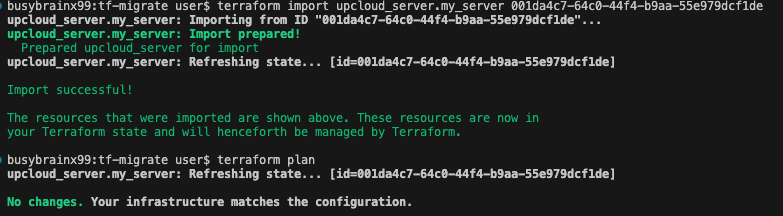
This imports the server created with OpenTofu into Terraform. When you run terraform plan, it reports no changes, proving you can move between Terraform and OpenTofu with only minor configuration tweaks and no impact on the underlying infrastructure.
Step 5: Clean up resources
Once you’ve confirmed that Terraform and OpenTofu see the same infrastructure, you can clean up both the temporary workspace and your deployed server.
Delete the temporary migration folder
In your /tf-migrate directory:
cd ..
rm -rf /tmp/tf-migrate
This removes the throwaway copy used for migration testing.
Destroy the real infrastructure with OpenTofu
Switch back to your original terminal where you were inside the main project directory (opentofu-upcloud-starter) and run:
tofu state list
tofu destroy -auto-approve
OpenTofu will decrypt the remote state, remove all provisioned resources on UpCloud, and leave your Object Storage bucket intact.
(Optional) Delete the Object Storage instance
If you’re done experimenting, you can safely delete the Object Storage instance and its associated bucket from your UpCloud dashboard.
- Log in to your UpCloud control panel
- Navigate to Storage → Object Storage
- Select your instance and choose Delete
This removes the encrypted state bucket entirely and closes the tutorial environment.
With that, you’ve completed the practical section of this guide, from configuring encrypted remote state to validating policies and confirming Terraform compatibility. Before moving on, it’s worth looking at a few common pitfalls you might encounter when working with OpenTofu and how to avoid them.
Common pitfalls and how to avoid them
Keeping these pitfalls in check early on will help you avoid most of the frustrations teams face when working with OpenTofu.
- Mixing Terraform and OpenTofu binaries: Running both tools(e.g., tofu apply and terraform apply) in the same repository or pipeline can cause provider or state inconsistencies. Use a version manager like asdf or a .tool-versions file to isolate the OpenTofu binary. Ensure your pipelines use only one tool per project.
- Ignoring provider version pinning: Providers frequently release updates, and not pinning versions, whether locally or in CI/CD, can cause builds to break due to feature differences. Always specify versions in your required_providers block and lock them with .tofu.lock.hcl.
- Not encrypting the backend: Storing state files in unencrypted forms exposes sensitive data, including IP addresses, credentials, and metadata. Enable OpenTofu’s built-in encryption or use a backend that supports encryption at rest.
- Storing state locally: Keeping local state prevents collaboration and increases the risk of overwrites. Use remote object storage for shared access and reliable recovery.
- Not cleaning up unused state: Old resources can linger in your state file even after deletion, adding unnecessary complexity. Run tofu state rm or rebuild cleanly when making significant structural changes.
- Poor naming or inconsistent paths: Inconsistently naming environments (for example, one developer uses production while another uses prod) can lead to accidental overwrites. Set standard naming conventions and folder structures across your team.
Next steps
- Team safety and locking. UpCloud Object Storage doesn’t provide state locking. Serialize
tofu applyin CI (one job per workspace via a concurrency group), or run a small Consul cluster on UpCloud and use theconsulbackend for locks. - Structure environments. Split repo into
/modules/*and/envs/{dev,staging,prod}. Scope remote-state keys per env and pass module outputs between stacks. - Harden encryption. Keep client-side AES-GCM enabled. Store the passphrase in CI secrets. Rotate keys on a schedule and document recovery steps.
- Enforce policy. Run Conftest on every PR and fail on any
deny. If you rely onfuture.keywordsin Rego, require OPA ≥ 0.58 or remove those imports for broader compatibility. - Secrets hygiene. Never commit
.env, state files, or plans. Use a.gitignoreand injectUPCLOUD_*andTF_VAR_encryption_passphrasevia CI secrets. - Migration safety. When testing Terraform ↔ OpenTofu, do not point Terraform at OpenTofu’s client-side-encrypted remote state. Migrate to local state first, then
terraform import.
Want background first? Read OpenTofu 101: Concepts and Best Practices.
Discussion