Beyond PyTorch vs. TensorFlow 2026
-
About
- Type
- Blog
- Categories
- GPUsLong reads
- Tags
- GPU servers
About
Posted on 2 October 2025
The modern AI stack is layered. You build and train in a frontend, you optimize execution with a compiler, and you expose models through a serving plane. Underneath sit GPUs, networking, storage, and observability. These choices determine developer speed, cold start, throughput, and how you operate in production. As load grows, infrastructure matters as much as the stack itself, whether you run it in-house or on a provider like UpCloud.
How to use this guide
Keep layers straight
PyTorch
TensorFlow
Keras 3
Quick picks
Before going further, here’s a rule of thumb: framework ≠ compiler ≠ server. Think of it like this:

Compilers determine performance, cold-start, and portability.
torch.compile() wraps your module for JIT‑style graph capture via TorchDynamo and compiles with Inductor unless you choose another backend. Great when you want speed without changing your code:
import torch
model = MyModel().eval().cuda()
compiled = torch.compile(model)   # explicit; eager is still the global default
y = compiled(x)
Typical speedups depend on model and warmup. Unsupported ops or dynamic shapes may trigger recompiles or fall back to eager.
Export to a stable graph, compile ahead of time, and package as a shared library you can load in Python or non-Python runtimes. Improves startup and enables lean server processes.
Important: torch._inductor.aoti_compile_and_package and aoti_load_package are prototype APIs with evolving behavior. Validate artifacts against your PyTorch minor version before promoting to production. Treat artifacts and APIs accordingly. PyTorch Documentation
import torch
from torch.export import export, Dim

ep = export(model, (dummy_input,),
            dynamic_shapes={"x": {0: Dim("batch", 1, 1024)}})

torch._inductor.aoti_compile_and_package(
    ep, package_path="model.pt2"
)XLA is part of OpenXLA and powers compilation in TensorFlow and JAX, optimizing graphs across hardware. In TensorFlow you can enable it via tf.function(jit_compile=True). OpenXLA Project
| Need | Pick |
| Fast, dynamic workloads | torch.compile() |
| Production inference w/ low latency | torch.export + AOTInductor |
| TensorFlow-heavy teams on TPUs | XLA (jit_compile=True) |
Training a model is just half the journey. The next step is serving making your model accessible so it can answer real-world requests, like image classifications, language completions, or predictions on live data.
If you’re new to this:
Model Serving is how your trained model becomes an API, something a website, app, or other system can call to get results. Think of it as shipping your model into production.
If you’re already deploying:
You know that serving isn’t just about speed. It’s also about reliability, scale, and visibility into how your model performs over time. Here’s how the current serving stacks compare:
TensorFlow Serving is the go-to for production TensorFlow models. It supports REST/gRPC APIs, version control, and advanced features like auto-batching and Prometheus metrics.
Prometheus metrics: scrape http://<SERVER_IP>:8501/monitoring/prometheusvLLM is optimized for large language models (LLMs). It gives you an OpenAI-style interface, with support for streaming responses, dynamic batching, and low latency.
NVIDIA Triton provides multi-framework serving and a Prometheus metrics endpoint (default at :8002/metrics). Pair with TensorRT-LLM for peak GPU throughput. NVIDIA Docs
Note on TorchServe: The repository was archived on Aug 7, 2025 and marked “Limited Maintenance.” Do not adopt it for new systems.
Whether you use TF Serving, Triton, or vLLM, you need to monitor what’s happening in production:
Pick by priority: ease of use, portability, performance, or production. Scan the matrices and match the row to your use case.
Quick picks: Ease: Keras 3, BentoML. Performance: Triton/TensorRT-LLM; for LLMs, vLLM. Portability: KServe, BentoML, Ray Serve. Production: TF Serving, KServe, Triton/TensorRT-LLM
Legend: ✔ great fit · △ workable with effort · ✖ not ideal/unsupported.
| Use case / priority | Keras 3 | PyTorch | TensorFlow | torch.compile / AOTI | XLA (TF) |
| Beginner-friendly | ✔ High | ✔ Moderate | △ Steeper | ✖ Advanced only | ✖ Advanced only |
| Rapid prototyping | ✔ | ✔ | △ More verbose | △ Extra tuning | △ Compilation req |
| Production inference | △ Needs glue | ✔ With setup | ✔ Strong | ✔ Faster start time | ✔ Mature |
| LLM inference (chatbots etc.) | △ Not ideal | ✔ via vLLM | △ via vLLM | △ Limited impact | △ Works w/ XLA |
| Observability (Prometheus) | ✖ Add-on | △ via serving stack (Triton/vLLM) | ✔ Built-in | △ Needs setup | ✔ Built-in |
| Hardware optimization (GPU/TPU) | △ Basic | ✔ CUDA, AMP | ✔ CUDA, TPU | ✔ Fast startup | ✔ XLA on TPU |
| Multi-framework portability | ✔ Top choice | △ Code changes | △ Code changes | △ Some friction | ✖ TF-only |
| Use case / priority | TorchServe (Legacy; archived Aug 2025) | TF Serving | BentoML | KServe |
| Beginner-friendly | ✖ Legacy/archived | ✔ Moderate | ✔ High | △ Steeper |
| Rapid prototyping | ✖ | ✔ Fast setup | ✔ CLI quickstart | △ YAML + K8s |
| Production inference | ✖ Use TF Serving or Triton | ✔ | ✔ Strong packaging | ✔ Mature on K8s |
| LLM inference (chatbots etc.) | ✖ | △ Basic support | △ via integrations | △ via runtimes |
| Observability (Prometheus) | ✖ | ✔ | ✔ Built-in | ✔ via Prometheus |
| Hardware optimization | ✖ | ✔ GPU | △ Runner-dependent | △ Backend-dependent |
| Portability | ✖ | ✖ TF-only | ✔ Any runtime | ✔ Multi-runtime |
| Use case / priority | vLLM | Triton / TensorRT-LLM | Ray Serve | KServe |
| Beginner-friendly | △ Dev-focused | ✖ Not-beginner-ready | △ Requires Ray | △ Steeper |
| Rapid prototyping | ✔ LLMs only | ✖ Setup complexity | △ Cluster setup | △ YAML + K8s |
| Production inference | ✔ | ✔ Best performance | ✔ Scales on Ray | ✔ Mature on K8s |
| LLM inference (chatbots etc.) | ✔ Native | ✔ Top-tier | ✔ via vLLM | △ via runtimes |
| Observability (Prometheus) | △ Basic | ✔ With setup | ✔ Built-in | ✔ via Prometheus |
| Hardware optimization | ✔ Good | ✔ Best on NVIDIA | △ Backend-dependent | △ Backend-dependent |
| Portability | ✔ Python API | △ NVIDIA ecosystem | ✔ Any backend | ✔ Multi-runtime |
Notes: vLLM targets LLM serving. Triton/TensorRT-LLM favors NVIDIA GPUs. KServe assumes Kubernetes. Ray Serve is an app-level scaler and often pairs with vLLM.
All the frameworks, compilers, and serving stacks we’ve covered need solid infrastructure. That’s where UpCloud GPUs come in: fast, reliable, and ready to run production-grade deep learning.
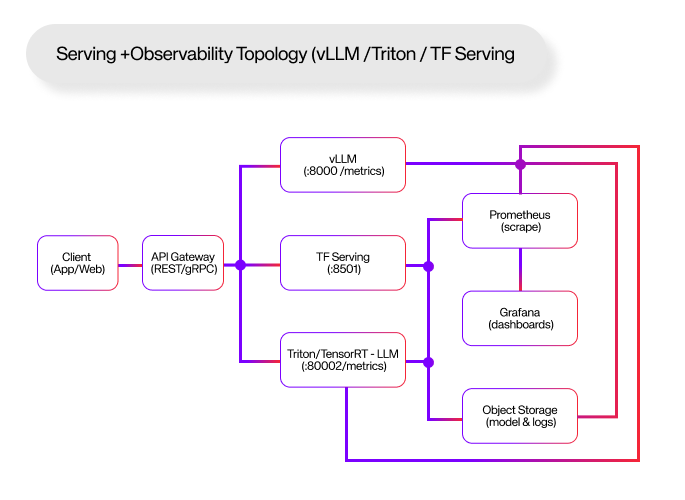
Here’s a quick path from model to deployed endpoint on UpCloud.
Spin up a GPU instance from the UpCloud control panel. Choose an L40S GPU plan in fi-hel2; the command below auto-selects one from your account.
# Auto-pick an L40S GPU plan in fi-hel2 and create a server
# Requires: upctl logged in, jq installed

ZONE="fi-hel2"
PLAN="$(upctl server plans -o json \
  | jq -r '.[] | select(.name | test("^GPU-.*L40S$")) | .name' \
  | head -n1)"

if [ -z "$PLAN" ]; then
  echo "No L40S GPU plans found in your account." >&2
  exit 1
fi

upctl server create \
  --title gpu-server \
  --zone "$ZONE" \
  --plan "$PLAN" \
  --ssh-keys ~/.ssh/id_*.pub \
--waitPyTorch: use the official selector to get the right command for your OS, Python, and CUDA. Do not hard-code an old wheel index.
Use the official installer selector for your OS/Python/CUDA and copy the command. Get started – PyTorch.
TensorFlow: install the current release (2.20.0 as of Oct 2, 2025).
pip install tensorflow==2.20.0nvidia-smiOption A: vLLM (LLMs, OpenAI-compatible)
pip install vllm
vllm serve meta-llama/Llama-3.2-3B-Instruct --port 8000
# API base: http://<SERVER_IP>:8000/v1

Prometheus: http://<SERVER_IP>:8000/metrics  (default server port: 8000)
Default server binds on 8000 and exposes /metrics.
docker run --gpus=all --rm -p 8000:8000 -p 8001:8001 -p 8002:8002 \
  nvcr.io/nvidia/tritonserver:24.08-py3 tritonserver --model-repository=/models
# HTTP :8000, gRPC :8001, Prometheus metrics :8002
Metrics endpoint and default ports per docs.
docker run -p 8501:8501 \
  -v /models/my_model:/models/my_model \
-e MODEL_NAME=my_model -t tensorflow/servingBoth vLLM and Triton expose Prometheus metrics and provide example dashboards you can import into Grafana.
scrape_configs:
  - job_name: vllm
    static_configs:
      - targets: ['<SERVER_IP>:8000']  # vLLM exposes /metrics
  - job_name: triton
    static_configs:
      - targets: ['<SERVER_IP>:8002']  # Triton /metrics
References for enabling and scraping metrics. DeepWiki
Scale horizontally with Kubernetes on UpCloud or vertically by moving up GPU plans. As traffic grows, add request routing and autoscaling via KServe or Ray Serve.
By 2026, torch.compile and AOTInductor artifacts, XLA compilation, and modern serving stacks like vLLM and Triton are standard practice. The question isn’t PyTorch or TensorFlow; it’s how your whole stack fits for cost, scale, and performance.
Adopt the layered mindset. You’ll avoid lock-in, optimize for today, and stay ready for what ships next.
1) Is PyTorch or TensorFlow faster in 2026?
Comparable for most users. Compilers like torch.compile and XLA matter more than the logo. Enable them and measure.
2) Should beginners learn PyTorch or TensorFlow first?
Start with PyTorch for clarity and fast iteration. Use TensorFlow as your pipeline hardens.
3) Where does Keras 3 fit in?
A multi-backend frontend that runs on TF, JAX, and PyTorch. Great for portability and teaching.
4) How do I serve a PyTorch LLM in production?
Use vLLM for an OpenAI-style API or Triton/TensorRT-LLM for maximum throughput. Both expose Prometheus metrics for SLOs.
5) Do I need a compiler like torch.compile or XLA?
If you care about latency or cost, yes. They optimize execution. XLA is part of OpenXLA and powers TF and JAX.
6) What about TorchServe?
Do not start new projects with it. The repo was archived in Aug 2025 and marked limited maintenance.
7) Can I switch frameworks later?
Keras 3 and ONNX improve portability, but custom ops and advanced layers add friction.