Launching UpCloud Object Storage – Data storage made simple!
-
About
- Type
- Blog
- Category
- Announcements
About
Posted on 22 October 2020
Bringing a project to the point where it’s ready for the unveiling is always worth a celebration and even more so after a long development. Object storage service has been a long time coming but we trust that the wait will have been worth it. Today, after a lot of hard work, we are excited to launch UpCloud Object Storage!
Our standard block storage options, MaxIOPS and HDD, offer high performance but can only be made available to a single Cloud Server at the time. In contrast, UpCloud Object Storage runs independently from any Cloud Server allowing a number of systems to access data simultaneously. Thanks to its architecture, object storage is often favoured for storing large datasets.
Some notable examples are photos on Facebook, songs on Spotify, or files in many online collaboration services. Object Storage also provides exciting possibilities for data analytics. Especially when combined with the performance and flexibility of our cloud storage, there’s little it can’t achieve!
The secure and redundant UpCloud Object Storage is the perfect place to store any data for your needs. Thanks to the S3-compatible and programmable UpCloud API, you have a host of options for existing tools and code implementations. These can make quick work of integrating Object Storage with your application.
Object Storage organises all files in containers called buckets. These are easy to create and manage straight from your UpCloud Control Panel, no prior experience needed! Additionally, you can also allow anonymous public downloads by enabling HTTPS Access for hassle-free sharing and file delivery. Users can deploy and manage Object Storage instances at their UpCloud Control Panel or via the UpCloud API.
Advanced users might want to make use of S3 clients to manage their Object Storage. You have a number of popular S3 clients and command-line tools to integrate your UpCloud Object Storage with existing system and services.
Individual Object Storage instances have a capacity limit of 1 TB. Users can deploy as many Object Storage instances as needed for their storage capacity requirements. In addition, any smaller Object Storage instances can be easily scaled up by simply adding more storage. This allows your Object Storage to grow along with your services.
All buckets are private by default keeping your data safe and secure. Furthermore, the endpoint URL for connecting to an individual Object Storage instance always uses the standard HTTPS encryption for securing data in transit. Rest assured your data remains secure at all times.
Connecting an S3 compatible client to an Object Storage instance is done using secure codes called access and secret keys. These are generated at Object Storage creation but can also be manually set according to your personal preference via the UpCloud API.
User can also enable public HTTPS access to a specific bucket by using the option at their UpCloud Control Panel or via the API. Once enabled, any objects in the specific bucket can be accessed anonymously via a direct link.
UpCloud Object Storage comes in three plans with data capacities of 250 GB, 500 GB and 1 TB. All at affordable prices! You have the following storage sizes to choose from for your data storage needs.
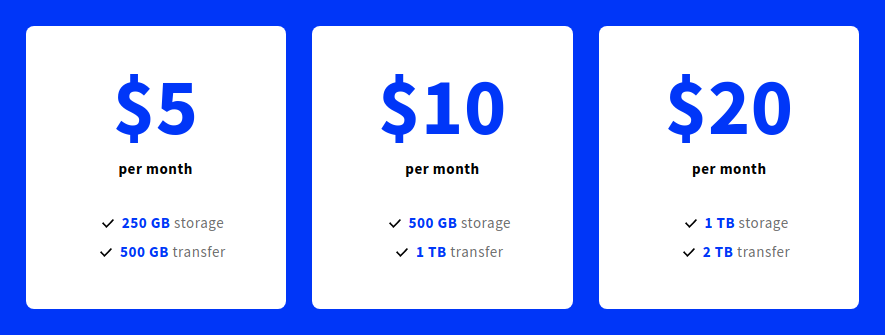
Each plan also includes a set amount of transfer quota per month. Furthermore, with the upcoming launch of our Network Transfer Pool, your Object Storage instances and Cloud Servers can share their transfer quotas without any extra configuration or fee!
If your project or application has the need to handle large amounts of unstructured data, you should make use of Object Storage. Learn more about the new UpCloud Object Storage and how to use it in our tutorials for a quick start via the UpCloud Control Panel, advanced options using the UpCloud API and how to put it in use with the S3cmd client.


Discussion