PostgreSQL vs MySQL: A Practical Guide for Modern Workloads
-
About
- Type
- Blog
- Categories
- ComparisonsLong reads
About
Posted on 30 March 2026
If you’ve ever searched for “PostgreSQL vs MySQL”, you’ve probably run into the same recycled advice: MySQL is faster for reads, Postgres is better for complex queries. That line has been copied and pasted for over a decade, and it doesn’t help anyone choosing a database in 2026.
The truth is, both engines have evolved far beyond those cliches. Postgres now powers AI workloads with native vector search and time-series analytics through extensions like pgvector and TimescaleDB. MySQL, on the other hand, has matured with Group Replication, InnoDB Cluster, and Vitess. The real question at this point isn’t which of the two is better, rather which suits your use case best.
That’s the focus of this guide. We’ll map real-world scenarios to the engine that fits the best. From SaaS CRUD apps and ecommerce stores to analytics-heavy pipelines, IoT systems, and GIS platforms, you’ll see where Postgres shines, where MySQL still wins, and what trade-offs actually look like in production.
Whether you’re deploying your own cluster or using a managed service like UpCloud’s, this is the practical, 2026-ready guide to choosing the right database and making that choice with confidence.
The first question is simple: why not just use one database for everything?
And that is because databases optimize for different trade-offs. Some prioritize strict transactional guarantees and extensibility. Others focus on operational simplicity, predictable replication, or lightweight performance under standard web workloads. Once you move beyond a basic CRUD app, those differences start shaping architecture decisions, scaling costs, and even hiring needs.That’s why it helps to step back and think in terms of workload. A SaaS startup with thousands of concurrent sessions has very different needs from a fintech company handling regulated transactions or an AI team storing embeddings.
The matrix belowmaps common production patterns like CRUD SaaS apps, ecommerce sites, analytics workloads, vector search, time-series data, GIS-heavy systems, and multi-region deployments, against how PostgreSQL and MySQL actually perform under those conditions.
| Workload Pattern | PostgreSQL | MySQL |
|---|---|---|
| CRUD SaaS Apps | ✔ Excellent for transactional consistency, JSONB flexibility, and complex queries. | ✔ Great for simple CRUD apps; easy scaling with read replicas and ORM support. |
| Ecommerce / Read-Heavy Sites | △ Strong consistency and extensibility, but replication tuning (lag, autovacuum) required at scale. | ✔ Optimized for read-heavy workloads; mature replication and caching support. |
| Analytics / OLTP-OLAP Mix | ✔ Advanced indexing (GIN, BRIN, partial), parallel queries, and CTE performance. | △ Can handle analytics but limited window functions; best used with external warehouse. |
| AI / ML (Vector Search) | ✔ Native pgvector support; integrates directly with embeddings and RAG pipelines. | △ Experimental vector features emerging; still early for production use. |
| Time-Series / IoT | ✔ Excellent via TimescaleDB or native partitioning; efficient compression and retention policies. | △ Works with partitions but lacks time-series extensions; higher manual tuning. |
| GIS / Geospatial Apps | ✔ Full PostGIS support for spatial queries, projections, and geometry types. | △ Basic spatial indexes; less robust geometry support. |
| Multi-Tenant SaaS | ✔ Rich schema isolation, row-level security (RLS), and extensions for tenant scoping. | △ Works fine with logical DB separation; weaker tenant-level access control. |
| Multi-Region / Global Scaling | △ Reliable with logical replication and tools like Citus; consistency vs latency trade-offs. | ✔ Strong ecosystem with Vitess and InnoDB Cluster; proven for global read/write splits. |
| High Concurrency/Connection Volume | △ Weaker native connection handling. Commonly paired with PgBouncer or custom pooling layers to handle large numbers of client connections efficiently. | ✔ More lightweight thread-based model; generally handles higher connection counts with less overhead, though pooling is still recommended at scale. |
Next, let’s unpack why each database behaves the way it does, from concurrency models and indexing depth to replication strategies, maintenance realities, and cost structures.
Database performance is more than just “which database runs faster”. It’s about how each handles concurrency, queries, and connection churn under real-world pressure.
Concurrency models are where PostgreSQL and MySQL start to diverge. Postgres uses MVCC (Multi-Version Concurrency Control), which allows readers to access older row versions while writers create new ones. In practice, this means readers don’t block writers, which is powerful for collaborative apps or analytics dashboards with constant reads and updates happening at the same time.
The trade-off is that MVCC generates dead tuples that must later be cleaned up by autovacuum. If vacuuming falls behind, table and index bloat can increase, disk usage grows, and query performance may degrade. So while readers aren’t blocked, operational tuning becomes critical under sustained write-heavy workloads.
MySQL’s InnoDB also uses MVCC internally but relies more heavily on locking semantics for coordination. It performs well for short, simple transactions but can hit contention under high-write concurrency unless tuned carefully.
Next, there’s indexing depth. PostgreSQL offers a full toolbox. GIN, GiST, BRIN, hash, partial, and expression indexes, on top of native indexing on JSONB and full-text search are all supported. MySQL, while still improving, primarily relies on B-tree and covering indexes, with some support for functional indexes and histograms. For complex filters, JSON queries, or text-heavy workloads, Postgres usually wins on both speed and flexibility.
Connection management is one of the silent killers of modern apps. This is especially true for serverless ones that open thousands of transient connections. Postgres often relies on pgBouncer or Odyssey to handle pooling efficiently. MySQL counters with ProxySQL, which excels at routing reads and writes to replicas while managing bursty workloads. Both can scale, but Postgres generally needs external pooling earlier in the game.
Every database can scale. The important question is “how much pain does it cause along the way?”. PostgreSQL and MySQL both offer strong scaling and high availability (HA) options, but they approach the problem differently.
Replication is the foundation when scaling relational databases. PostgreSQL supports streaming replication (binary, near-real-time) and logical replication, which lets you replicate specific tables or subsets, which is perfect for analytics offloads or multi-tenant sharding. MySQL offers asynchronous replication by default, with semi-sync and group replication for tighter consistency. If you’ve used InnoDB Cluster or Aurora, you’ve seen how MySQL’s replication story has matured into a solid, predictable system in managed offerings.
When it comes to sharding, PostgreSQL historically relied on external tools, but extensions like Citus now make distributed Postgres feel native by supporting distributed joins and parallel queries. MySQL, meanwhile, leads the pack with Vitess, the same sharding layer that powers YouTube. It abstracts shards behind a single logical schema, letting massive workloads scale horizontally without rewriting queries.
Multi-region architecture is where the conversation gets more nuanced. Traditional PostgreSQL deployments often use active-standby replication across regions, which is simple to reason about but can suffer from replica lag during sustained write pressure. Achieving active-active consistency used to require significant custom conflict resolution and orchestration.
That situation has changed. Modern distributed PostgreSQL variants like pgedge now support active-active, multi-region topologies with globally consistent transactions and built-in conflict handling. These systems coordinate writes across regions and provide strong consistency guarantees without relying purely on asynchronous replicas. The trade-off is higher write latency due to cross-region consensus, but for globally distributed financial systems, SaaS platforms with regional data residency, or compliance-heavy applications, this architecture can be compelling.
MySQL’s Group Replication and Vitess also enable cross-region read/write patterns, typically with clearer separation of primary and replica roles or controlled multi-primary setups. In practice, the decision often comes down to whether you prefer a distributed SQL model with global consensus semantics or a shard-and-replicate model with operational simplicity.
Finally, failover and HA. Postgres provides quorum commit, Patroni, or Stolon for automated failover and fencing, while MySQL leans on built-in InnoDB Cluster failover mechanisms. Both can achieve near-zero RPO and low RTO, but MySQL’s managed ecosystems tend to automate it more cleanly.
Every database has its comfort zone, the kinds of workloads where it just feels effortless. Understanding that zone is the key to making the right long-term bet.
Take AI-powered SaaS products. If you’re building a knowledge assistant for a customer support platform or embedding search into a developer documentation portal, PostgreSQL with pgvector lets you store embeddings alongside user data, permissions, and metadata in the same transactional system. That simplifies architecture for RAG pipelines and avoids running a separate vector database early on. MySQL’s vector support is evolving, but today it’s less mature for production-grade semantic search systems.
In regulated domains such as banking or fintech, PostgreSQL often fits better because of its strong ACID guarantees, advanced indexing, row-level security, and extensibility. A digital lending platform handling multi-step transactions, audit trails, and compliance constraints benefits from Postgres’s transactional depth and features like RLS for tenant isolation. MySQL works well for high-volume transactional systems too, but complex financial workflows tend to lean toward Postgres for its stricter semantics and ecosystem.
For time-series and IoT data (such as a fleet management company tracking vehicle telemetry or an energy provider collecting smart meter data), PostgreSQL dominates. TimescaleDB and native table partitioning let you manage retention, compression, and continuous aggregates seamlessly. MySQL can handle time-series workloads with partitions and indexes, but it demands more manual optimization, especially for large historical datasets.
Geospatial workloads are another clear divider. If you’re building a logistics optimization engine, a ride-hailing backend, or a real estate analytics platform that relies on spatial joins and projections, Postgres’s PostGIS extension is the gold standard. It supports rich spatial types, projections, and topology functions that MySQL’s basic spatial indexes can’t match. If you’re building logistics, mapping, or location-based analytics, Postgres wins hands down.
For semi-structured data, such as a SaaS product storing dynamic configuration blobs or feature flags per tenant, both engines support JSON. But, PostgreSQL’s JSONB data type allows indexing, partial updates, and advanced operators (@>, ?, ||), making it practical for semi-structured data models. MySQL’s JSON implementation is functional and fast for simple use cases, but lacks the same query depth.
When it comes to full-text search, PostgreSQL again goes beyond the basics. A content-heavy platform like a documentation portal or marketplace can rely on PostgreSQL’s built-in TS vector system that supports stemming, ranking, and multilingual search out of the box. MySQL’s FULLTEXT indexes are easier to use, but less flexible, especially when combined with Boolean logic or ranking relevance.
A major part of choosing a database is about living with it in production. That’s where operational realities like maintenance, backups, observability, and security start to separate PostgreSQL and MySQL.
Let’s start with maintenance. PostgreSQL’s autovacuum process, which is a background worker that automatically reclaims storage from outdated row versions and prevents transaction ID wraparound, is both a blessing and a curse. It keeps tables lean and transaction IDs in check, but it can surprise teams that ignore tuning or monitoring. Large update-heavy tables can accumulate “bloat”, impacting performance until vacuum catches up.
MySQL avoids this specific issue, but its undo and purge processes can cause their own slowdowns under sustained write pressure. The difference? Postgres needs care to prevent lag, while MySQL needs caution to avoid fragmentation and I/O spikes.
Backups and point-in-time recovery (PITR) are another major concern. PostgreSQL uses Write-Ahead Logs (WAL) and tools like pgBackRest or Barman to enable incremental, time-based recovery. MySQL achieves the same with binary logs (binlogs) and utilities like Percona XtraBackup. Both can reach similar RPO/RTO targets, but PostgreSQL’s backup tools tend to integrate more cleanly with cloud automation workflows.
On monitoring and observability, Postgres exposes rich internal metrics through the pg_stat_* views, letting teams visualize query plans, blocking sessions, and index usage directly. MySQL’s Performance Schema and sys schema offer comparable insights but require more configuration to get full visibility.
Security and compliance round out the picture. PostgreSQL supports row-level security (RLS), auditing extensions, and fine-grained roles, which make it attractive for multi-tenant or regulated workloads. MySQL’s authentication plugins and audit logging features are improving, but still more limited in granularity.
In day-to-day operations, both are stable and predictable once tuned. But, PostgreSQL rewards hands-on teams that want transparency and control, while MySQL rewards teams that want something quietly reliable.
At some point, most teams face a migration, whether it’s moving off MySQL to gain Postgres features or the other way around to simplify operations. Both directions are possible, but one is far more common.
Before anything else, it’s worth clarifying one thing: upgrading PostgreSQL 13 to 15 or MySQL 5.7 to 8.0 is very different from migrating between engines. An in-place upgrade preserves your schema, data model, and operational assumptions. A cross-engine migration forces you to revalidate types, constraints, replication behavior, and even application logic.
There are also cases where even a major version upgrade is better handled as a clean installation. For example:
In these situations, teams often provision a fresh cluster, migrate data into it, validate behavior, and cut over. Conceptually, that looks very similar to an engine-to-engine migration.
A typical example could be, a SaaS analytics platform started on MySQL, but now needs richer JSON querying, partial indexes, or vector search for AI features.
Primary drivers of migration:
Here’s what a typical migration flow would look like:

The biggest surprises in this case often come from implicit behavior differences rather than schema conversion itself. Things like TINYINT(1) vs BOOLEAN and AUTO_INCREMENT vs SERIAL / IDENTITY can break flow. Rewriting stored procedures can also be time-consuming.
A typical example in this case can be a globally distributed SaaS product wants to adopt Vitess for horizontal scaling and simplify operational overhead.
Primary drivers of such migration:
Here’s what the flow would look like in this case:
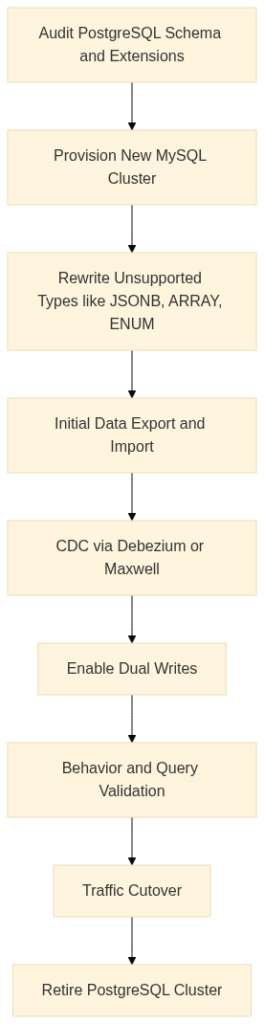
This path usually involves more schema redesign than the reverse direction. A few common friction points can be:
When zero downtime is critical, the playbook looks similar on both sides. You run dual writes to both databases for a period, use Change Data Capture (CDC) through Debezium or Maxwell’s Daemon, and plan a blue-green cutover with rollback readiness. The key here is verifying application behavior against both engines before flipping production traffic.
Here’s a quick 10-step migration checklist:
When teams compare databases, they often focus on licensing, but in reality, most of the cost lies in infrastructure and operational time.
Both PostgreSQL and MySQL are open source. PostgreSQL is released under a permissive PostgreSQL License, which allows modification and redistribution with very few restrictions. MySQL is dual-licensed under GPL and commercial terms, which matters if you embed it into proprietary software without complying with GPL obligations. This is one reason alternatives such as Percona Server for MySQL and MariaDB exist. They provide open-source-compatible distributions with additional performance, monitoring, or enterprise features while avoiding commercial licensing constraints.
In most cloud deployments, however, licensing is not the main driver. IOPS, storage growth, replication overhead, and engineer time are what shape long-term cost.
Let’s look at three common cost scenarios.
1. Startup MVP:
At small scale, costs are dominated by simplicity. MySQL’s low overhead and wide ORM compatibility make it slightly cheaper to run. A single-node instance with daily backups can run happily for months. Postgres is only marginally heavier but may require pgBouncer for connection pooling sooner if your framework opens too many connections (like with serverless functions).
2. Growing SaaS (multi-region, read replicas):
As concurrency rises, Postgres often saves money in indirect ways like better query plans, advanced indexes, and compression (TimescaleDB) can cut compute and storage use. However, managing replicas and vacuum tuning adds ops time. MySQL scales more linearly with read replicas, especially when paired with ProxySQL or Vitess, though binlog storage and replication lag need active management.
3. Regulated Fintech (compliance-heavy):
Postgres typically wins here. Row-Level Security (RLS), fine-grained auditing, and logical replication allow precise data governance without third-party tools. MySQL can match some of this using audit plugins and custom role hierarchies, but at the cost of more administrative complexity.
From a total cost of ownership (TCO) standpoint:
Managed services like UpCloud Managed Databases help this equation. You get backups, HA, and monitoring out of the box, letting your engineers focus on features, not failovers.
By this point, you’ve seen the trade-offs. But how do you decide which database to bet on, or when to switch? You can think of the following as a living checklist you can revisit whenever your architecture or workload evolves.
A quick decision flow might look like this:
Is workload read-heavy and predictable? → MySQL ✅
Is workload mixed or analytical? → PostgreSQL ✅
Do you need extensions (vector, GIS, time-series)? → PostgreSQL ✅
Need built-in horizontal scale (Vitess)? → MySQL ✅
Need fine-grained RLS or auditing? → PostgreSQL ✅
PostgreSQL and MySQL both scale beautifully when deployed with the right topology.
Single-AZ High Availability
For smaller clusters or regional workloads, high availability usually comes down to replication and backups:
Multi-AZ or Multi-Region Architectures
When uptime and latency across regions matter, replication topology becomes critical:
Sidecars and Supporting Utilities
Both engines benefit from sidecar processes and supporting tools that handle pooling, backups, and observability:
UpCloud’s flexibility supports both: run a managed Postgres for peace of mind, or self-host MySQL with full control. No lock-in either way.
PostgreSQL and MySQL have both evolved far beyond their stereotypes. In 2026, the choice isn’t just about “which is faster”, but about which aligns best with your application’s shape, scale, and data model. Postgres offers unmatched flexibility through its extensions, data types, and analytics-ready design. MySQL counters with operational simplicity, predictable scaling, and mature clustering tools like Vitess and InnoDB Cluster.
Both can power serious, global-scale applications. The difference lies in how much control or convenience you want. If you value transparency, extensibility, and complex workloads, Postgres is the long-term bet. If you want stability, automation, and easy replication, MySQL stays a trusted workhorse.
Whether you choose one or migrate between them, UpCloud’s managed and self-hosted database options let you deploy confidently, scale easily, and stay focused on building your data layer.
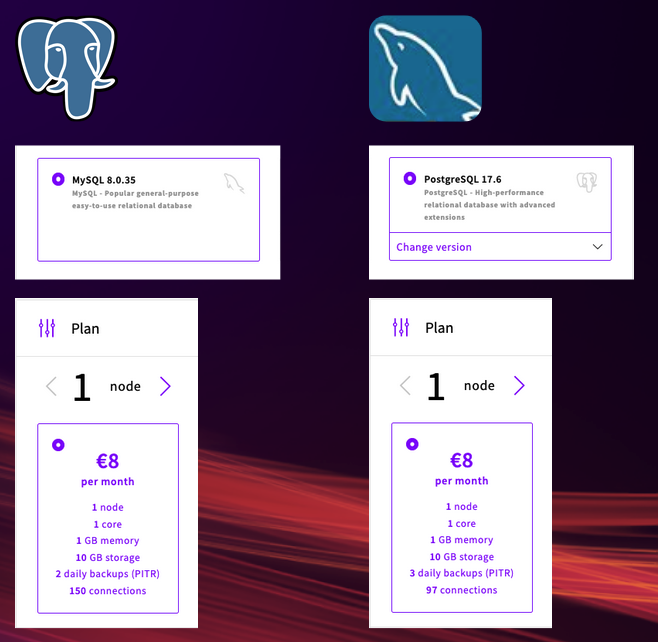
Sign up and try UpCloud Managed Database starting at $8/month!