Launching Simple backup – New easier way to secure your business-critical data
-
About
- Type
- Blog
- Category
- Announcements
New - NVIDIA B200 & B300 Dedicated GPU Clusters | Explore GPU clusters
About
Posted on 13.3.2020
To help our users to protect their cloud data, we’ve offered manual on-demand and automated scheduled backups, but we want to take things up a notch. Today, we are launching a new easier way of securing your business-critical data with the new Simple backup!
Configuring backup schedules and calculating retention periods can be more complicated than many are comfortable with. Therefore, we’ve made Simple backup the easiest way to backup your cloud server data. Much like our Simple server plans provide anyone regardless of technical skill a quick and easy way to choose a cloud server configuration, the new Simple backup gives an easy-to-use solution for the peace of mind on data safety.
Simple backup is the perfect companion for your Simple plan cloud servers. It safeguards the main system storage device that contains your server’s operating system, as well as most applications, and services. Put simply, it saves a snapshot of your cloud server.
The automated scheduled backup option is of course still available for cloud servers with more demanding configurations. These are now called Flexible Backup and continue to operate with the same trusted functionality.
Our backup technology is optimised for quick snapshots that ensure you’ll never experience interruptions or slowdowns due to the backup processes. While regularly taken backups are often scheduled outside business hours, taking a backup on UpCloud even during the busiest times is no hindrance.
Simple backup really makes taking backups a breeze, but just having backups would mean nothing if the data was difficult or slow to restore. With our backup technology, the most recent snapshots are kept close by for quick recovery even from the worst-case scenario. On the other hand, older backups are secured on a redundancy-ensured dedicated backup storage system.
Backing up your cloud server is like making multiple save files of your precious work. Frequent backups allow you to restore just the right version without reverting hours of hard work. Meanwhile, longterm backups can bring back files thought lost in cyberspace. The full one year schedule includes a total of 23 concurrently available backups. You will always have a backup of the data you are looking for up to a year from any changes to the data.
Our Simple cloud server plans focus on ease-of-use, performance, and of course, competitive pricing, and Simple backup is no different. Simple backup is priced affordably according to the data retention duration and the monthly cloud server plan price it is safeguarding. It also gives you a clear price for a complete backup solution and does away with uncertainty of the long-term costs.
You have the option to choose between 3 comprehensive backup plans depending on your needs. The following pricing is an example of the backup costs for a $10 Simple plan cloud server.
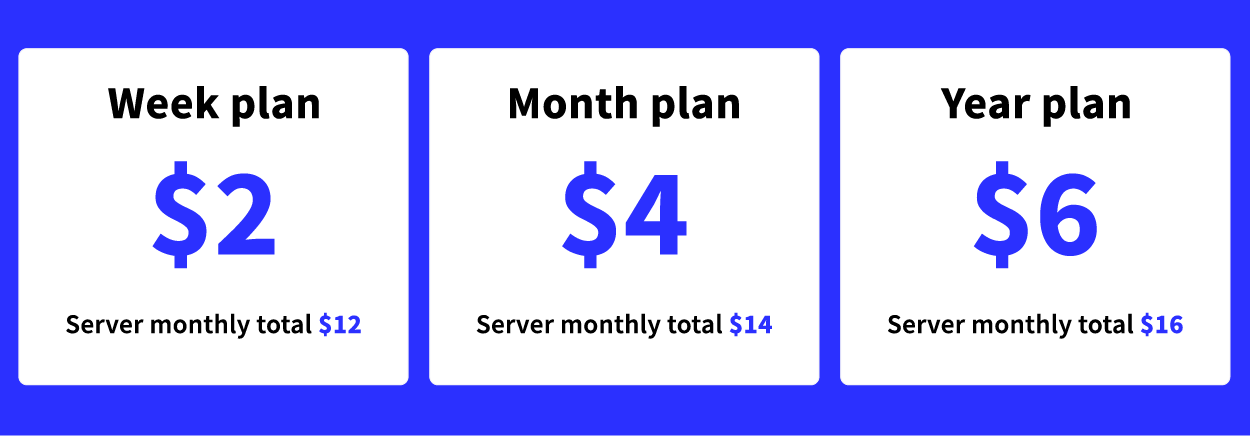
The plans include the following backups:
Regardless of your chosen plan, you can rest assured your business-critical data is secured using Simple backup! Find out more about Simple backup at the new product page. You can also find a detailed guide on how to use Simple backups in our tutorials or get started right away at your UpCloud control panel!


John Liberty
Great article. Your blog contains professional content, many thanks for that! This is exactly what I was looking for!